模块化介绍;CommonJs,AMD,CMD规范;ES Module
1. 模块化
1.1. 基础知识
模块化开发最终的目的是将程序划分成一个个小的结构
- 这个结构中编写属于自己的逻辑代码,有自己的作用域,不会影响到其他的结构
- 这个结构可以将希望暴露的变量、函数、对象等导出给其结构使用
- 也可以通过某种方式,导入另外结构中的变量、函数、对象等
结构就是模块,按照这种结构划分开发程序的过程,就是模块化开发的过程
JavaScript存在很多的缺陷
- 比如var定义的变量作用域问题
- 比如JavaScript的面向对象并不能像常规面向对象语言一样使用class
- 比如JavaScript没有模块化的问题
Brendan Eich本人也多次承认过JavaScript设计之初的缺陷,但是随着JavaScript的发展以及标准化,存在的缺陷问题基本都得到了完善
无论是web、移动端、小程序端、服务器端、桌面应用都被广泛的使用
1.2. 模块化的历史
在网页开发的早期,Brendan Eich开发JavaScript仅仅作为一种脚本语言,做一些简单的表单验证或动画实现等,那个时候代码还是很少的
- 只需要讲JavaScript代码写到
<script>标签中即可 - 并没有必要放到多个文件中来编写
- 甚至流行说 JavaScript 程序的长度只有一行
- 只需要讲JavaScript代码写到
但是随着前端和JavaScript的快速发展,JavaScript代码变得越来越复杂了
- ajax的出现,前后端开发分离,意味着后端返回数据后,需要通过JavaScript进行前端页面的渲染
- SPA的出现,前端页面变得更加复杂,包括前端路由、状态管理等等一系列复杂的需求需要通过JavaScript来实现
- 包括Node的实现,JavaScript编写复杂的后端程序,没有模块化是致命的硬伤
所以,模块化已经是JavaScript一个非常迫切的需求
- 但是JavaScript本身,直到ES6(2015)才推出了自己的模块化方案
- 在此之前,为了让JavaScript支持模块化,涌现出了很多不同的模块化规范:AMD、CMD、CommonJS等
常用的JavaScript模块化是CommonJS和ES6的模块化
1.3. 没有模块化带来的问题
早期没有模块化带来了很多的问题
- 命名冲突的问题
- 当然,可以通过立即函数调用表达式(IIFE)来解决
IIFE (Immediately Invoked Function Expression)
- 立即函数返回一个对象moduleA,使全局可以调用
1
2
3
4
5
6
7
8
9
10
11
12
13
14
15
16
17
18
19
20
21
22
/**
<script src="./fun1.js"></script>
<script src="./fun2.js"></script>
*/
// fun1.js
var moduleA = (function () {
var name = "why";
var age = 18;
var flag = true;
return {
name,
age,
flag
};
})();
// fun2.js
(function () {
if (moduleA.flag) {
console.log("my age is " + moduleA.name);
}
})();但是,带来了新的问题
- 必须记得每一个模块中返回对象的命名,才能在其他模块使用过程中正确的使用
- 代码写起来混乱不堪,每个文件中的代码都需要包裹在一个匿名函数中来编写
- 在没有合适的规范情况下,每个人、每个公司都可能会任意命名、甚至出现模块名称相同的情况
虽然实现了模块化,但是实现得过于简单,并且是没有规范的
- 需要制定一定的规范来约束每个人都按照这个规范去编写模块化的代码
- 这个规范中应该包括核心功能:模块本身可以导出暴露的属性,模块又可以导入自己需要的属性
- JavaScript社区为了解决上面的问题,涌现出一系列好用的规范
2. CommonJS规范
2.1. CommonJS规范和Node关系
CommonJS是一个规范,最初提出来是在浏览器以外的地方使用,并且当时被命名为ServerJS,后来为了体现它的广泛性,修改为CommonJS,也可以简称为CJS- Node是CommonJS在服务器端一个具有代表性的实现
- Browserify是CommonJS在浏览器中的一种实现
- webpack打包工具具备对CommonJS的支持和转换
所以,Node中对CommonJS进行了支持和实现,在开发node的过程中可以方便的进行模块化开发
- 在Node中每一个js文件都是一个单独的模块
- 这个模块中包括CommonJS规范的核心变量:
exports、module.exports、require - 可以使用这些变量来方便的进行模块化开发
模块化的核心是导出和导入,Node中对其进行了实现
- exports和module.exports可以负责对模块中的内容进行导出
- require函数可以帮助导入其他模块(自定义模块、系统模块、第三方库模块)中的内容
2.2. exports对象
注意:exports是一个对象,可以在这个对象中添加很多个属性,添加的属性会导出
1
2
3
4
5
6
// bar.js
const name = "why";
const age = 18;
exports.name = name;
exports.age = age;另外一个文件中可以导入
1
2
3
4
5
// main.js
const bar = require("./bar");
// { name: 'why', age: 18 }
console.log(bar);上面完成了什么操作呢?
- 意味着main中的bar变量等于exports对象
- 也就是require通过各种查找方式,最终找到了exports这个对象
- 并且将这个exports对象赋值给了bar变量
- bar变量就是exports对象
2.3. module.exports对象
但是Node中经常通过module.exports导出
1
2
3
4
5
6
7
8
// bar.js
const name = "why";
const age = 18;
module.exports = {
name,
age
};module.exports和exports有什么关系或者区别呢?
追根溯源,通过维基百科中对CommonJS规范的解析
- CommonJS中是没有module.exports的概念
- 但是为了实现模块的导出,Node中使用的是Module的类,每一个模块都是Module的一个实例,也就是module
- 所以在Node中真正用于导出的其实根本不是exports,而是module.exports,因为module才是导出的真正实现者
但是,为什么exports也可以导出呢?
这是因为module对象的exports属性是exports对象的一个引用
1
2module.exports = {}
exports = module.exports也就是说 module.exports = exports = main中的bar
为什么不能用
exports={name, age}- exports只是module.exports的引用,
exports = module.exports - 此时两者都指向同一个对象,可以通过
exports.name="why"来给对象添加属性, 但最终导出的执行者还是module - 当exports指向另一个对象时,它就失去了作用,最终module.exports依然指向一个{}空对象
- exports只是module.exports的引用,
2.4. 证明是同一个对象
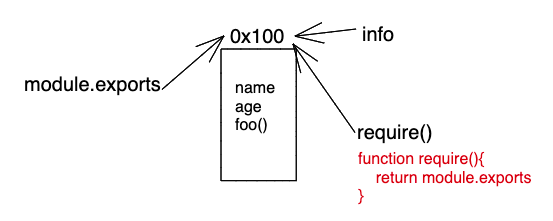
证明以下代码中 module.exports,info,bar指向的是同一个对象
bar.js
1
2
3
4
5
6
7
8
const info = {
name: "why",
age: 18,
foo: function(){
console.log("foo function");
}
}
module.exports = info;main.js
1
2
const bar = require("./bar");
console.log(bar);
2.4.1. 内存图
2.4.2. 修改info的name属性
bar.name值发生了改变
bar.js
1
2
3
4
5
6
7
8
9
10
11
12
13
const info = {
name: "why",
age: 18,
foo: function(){
console.log("foo function");
}
}
setTimeout(()=>{
info.name="test";
},1000);
module.exports = info;main.js
1
2
3
4
5
6
7
8
9
const bar = require("./bar");
// { name: 'why', age: 18, foo: [Function: foo] }
console.log(bar);
// test
setTimeout(()=>{
console.log(bar.name);
},2000);
2.4.3. 修改bar的name属性
info.name值发生了改变
bar.js
1
2
3
4
5
6
7
8
9
10
11
12
13
14
const info = {
name: "why",
age: 18,
foo: function(){
console.log("foo function");
}
}
// test
setTimeout(()=>{
console.log(info.name);
},2000);
module.exports = info;main.js
1
2
3
4
5
6
7
8
const bar = require("./bar");
// { name: 'why', age: 18, foo: [Function: foo] }
console.log(bar);
setTimeout(()=>{
bar.name="test";
},1000);
2.5. 三者引用属性值改变
module.exports,exports,require()三者项目引用的情况下,某个属性值改变会发生什么
从几个方面来研究会发生什么?
在三者项目引用的情况下,修改exports中name属性到底发生了什么?
三者中的name属性值都会改变在三者引用的情况下,修改了main中bar的name属性,在bar模块中会发生什么?
三者中的name属性值都会改变如果module.exports不再引用exports对象了,那么修改export还有意义吗?
没有意义,module.exports和require()已经指向新对象
2.6. require函数
require是一个函数,可以帮助引入一个文件(模块)中导出的对象
常见的查找规则:导入格式为 require(X)
2.6.1. Node核心模块
- X是一个Node核心模块,比如path、http
- 直接返回核心模块,并且停止查找
2.6.2. 文件路径
X是以 ./ 或 ../ 或 /(根目录)开头
第一步:将X当做一个文件在对应的目录下查找
- 如果有后缀名,按照后缀名的格式查找对应的文件
- 如果没有后缀名,会按照如下顺序
- 1> 直接查找文件X
- 2> 查找X.js文件
- 3> 查找X.json文件
- 4> 查找X.node文件
第二步:没有找到对应的文件,将X作为一个目录
- 查找目录下面的index文件
- 1> 查找X/index.js文件
- 2> 查找X/index.json文件
- 3> 查找X/index.node文件
- 查找目录下面的index文件
如果没有找到,那么报错:not found
2.6.3. node_modules
直接是一个X(没有路径),并且X不是一个核心模块
查找node_modules文件夹中的是否存在该项目
console.log(module.paths);打印查找顺序
1
2
3
4
5
6
7
8
9
10
11
12
13
[
'/Users/xxx/Documents/Workspace/VSCode/HTML/js/模块化/CommonJS/node_modules',
'/Users/xxx/Documents/Workspace/VSCode/HTML/js/模块化/node_modules',
'/Users/xxx/Documents/Workspace/VSCode/HTML/js/node_modules',
'/Users/xxx/Documents/Workspace/VSCode/HTML/node_modules',
'/Users/xxx/Documents/Workspace/VSCode/HTML/node_modules',
'/Users/xxx/Documents/Workspace/VSCode/node_modules',
'/Users/xxx/Documents/Workspace/node_modules',
'/Users/xxx/Documents/node_modules',
'/Users/xxx/node_modules',
'/Users/node_modules',
'/node_modules'
]如果上面的路径中都没有找到,那么报错:not found
2.7. 模块的加载过程
结论一:模块在被第一次引入时,模块中的js代码会被运行一次
结论二:模块被多次引入时,会缓存,
最终只加载(运行)一次- 为什么只会加载运行一次呢?
- 这是因为每个模块对象module都有一个属性:loaded
- 为false表示还没有加载,为true表示已经加载
结论三:如果有循环引入,那么加载顺序是什么?
main.js
1
2
3console.log("main");
require("./aaa");
require("./bbb");aaa.js
1
2console.log("aaa");
require("./ccc");bbb.js
1
2
3console.log("bbb");
require("./ccc");
require("./eee");ccc.js
1
2console.log("ccc");
require("./ddd");ddd.js
1
2console.log("ddd");
require("./eee");eee.js
1
console.log("eee");
依赖图
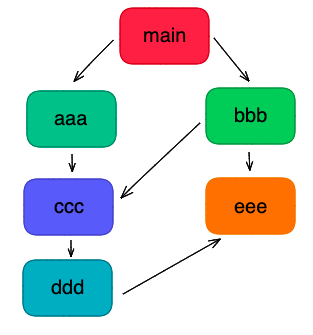
它们的加载顺序是什么呢?
- 这个其实是一种数据结构:图结构
- 图结构在遍历的过程中,有深度优先搜索(
DFS, depth first search)和广度优先搜索(BFS, breadth first search) - Node采用的是深度优先算法:main -> aaa -> ccc -> ddd -> eee -> bbb
2.8. CommonJS规范缺点
CommonJS加载模块是同步的
- 同步的意味着只有等到对应的模块加载完毕,当前模块中的内容才能被运行
- 这个在服务器不会有什么问题,因为服务器加载的js文件都是本地文件,加载速度非常快
如果将它应用于浏览器呢?
- 浏览器加载js文件需要先从服务器将文件下载下来,之后再加载运行
- 那么采用同步的就意味着后续的js代码都无法正常运行,即使是一些简单的DOM操作
所以在浏览器中,通常不使用CommonJS规范
- 当然在webpack中使用CommonJS是另外一回事
- 因为它会将我们的代码转成浏览器可以直接执行的代码
在早期为了可以在浏览器中使用模块化,通常会采用AMD或CMD
- 但是目前一方面现代的浏览器已经支持ES Modules,另一方面借助于webpack等工具可以实现对CommonJS或者ES Module代码的转换
- AMD和CMD已经使用非常少了,所以这里我们进行简单的演练
3. AMD规范
AMD主要是应用于浏览器的一种模块化规范
- AMD是Asynchronous Module Definition(异步模块定义)的缩写
- 它采用的是异步加载模块
- 事实上AMD的规范还要早于CommonJS,但是CommonJS目前依然在被使用,而AMD使用的较少了
规范只是定义代码的应该如何去编写,只有有了具体的实现才能被应用
- AMD实现的比较常用的库是require.js和curl.js
3.1. require.js的使用
第一步:下载require.js
- https://github.com/requirejs/requirejs
- 找到其中的require.js文件
第二步:定义HTML的script标签引入require.js和定义入口文件
data-main属性的作用是在加载完src的文件后会加载执行该文件
<script src="./lib/require.js" data-main="./src/main.js"></script>
3.2. 案例
main.js 引用 bar.js,bar.js引用foo.js
foo.js
1 | define(function () { |
bar.js
1 | define(function () { |
main.js
1 | require.config({ |
4. CMD规范
- CMD规范也是应用于浏览器的一种模块化规范
- CMD 是Common Module Definition(通用模块定义)的缩写
- 采用了异步加载模块,但是它将CommonJS的优点吸收了过来
- 但是目前CMD使用也非常少了
- CMD也有自己比较优秀的实现方案:SeaJS
4.1. SeaJS的使用
- 第一步:下载SeaJS
- https://github.com/seajs/seajs
- 找到dist文件夹下的sea.js
- 第二步:引入sea.js和使用主入口文件
- seajs是指定主入口文件的
4.2. 案例
main.js 引用 bar.js,bar.js引用foo.js
index.html
1 | <script src="./lib/sea.js"></script> |
main.js
1 | define(function (require, exports, module) { |
bar.js
1 | define(function (require, exports, module) { |
foo.js
1 | define(function (require, exports, module) { |
5. ES Module
5.1. 认识 ES Module
JavaScript没有模块化一直是它的痛点,所以才会产生社区规范:CommonJS、AMD、CMD等, 而后ES推出自己的模块化系统
ES Module和CommonJS的模块化有一些不同之处
- 一方面它使用了import和export关键字
- 另一方面它采用编译期的静态分析,并且也加入了动态引用的方式
ES Module模块采用export和import关键字来实现模块化
export负责将模块内的内容导出import负责从其他模块导入内容
了解:采用ES Module将自动采用严格模式:use strict
5.2. 案例代码
index.html
1 | <script src="./main.js"></script> |
main.js
1 | import { name, age } from "./bar.js"; |
bar.js
1 | export const name = "why" |
在浏览器中运行出现错误
1
Uncaught SyntaxError: Cannot use import statement outside a module (at main.js:1:1)
不进行声明,main.js被当作普通javascript文件进行解析,需要声明为模块
1
<script src="./main.js" type="module"></script>
在浏览器中运行,还是报错误
1
2Access to script at 'file:///Users/xxx/Documents/Workspace/VSCode/HTML/js/ES_Module/main.js' from origin 'null' has been blocked by CORS policy: Cross origin requests are only supported for protocol schemes: http, data, isolated-app, chrome-extension, chrome, https, chrome-untrusted.
GET file:///Users/xxx/Documents/Workspace/VSCode/HTML/js/ES_Module/main.js net::ERR_FAILED这个在MDN上面给出解释:https://developer.mozilla.org/zh-CN/docs/Web/JavaScript/Guide/Modules
- 需要注意本地测试,如果通过本地加载html 文件 (比如一个 file:// 路径的文件), 将会遇到 CORS 错误,因为 Javascript 模块安全性需要
- 需要通过一个服务器来测试
在VSCode中有一个插件:Live Server
5.3. export关键字
export关键字将一个模块中的变量、函数、类等导出
希望将其他中内容全部导出,它可以有如下的方式
方式一:在语句声明的前面直接加上export关键字
1
export const name = "why";
方式二:将所有需要导出的标识符,放到export后面的 {}中
1
2
3
4
5
6const name = "why";
const age = 18;
function foo() {
console.log("foo function");
}
export { name, age, foo };- 注意:这里的 {}里面不是ES6的对象字面量的增强写法,{}也不是表示一个对象的
- 所以:export {name: name},是错误的写法
方式三:导出时给标识符起一个别名
1
2
3
4
5
6const name = "why";
const age = 18;
function foo() {
console.log("foo function");
}
export { name as uname, age as uage, foo as ufoo };
5.4. import关键字
import关键字负责从另外一个模块中导入内容
导入内容的方式也有多种
方式一:import {标识符列表} from ‘模块’
1
import { name, age, foo } from './bar.js';
- 注意:这里的{}也不是一个对象,里面只是存放导入的标识符列表内容
方式二:导入时给标识符起别名
1
import { name as uname, age as uage, foo as ufoo } from './bar.js';
方式三:通过 * 将模块功能放到一个模块功能对象(a module object)上
1
import * as bar from "./bar.js";
5.5. export和import结合使用
为什么要export和import结合使用呢?
- 在开发和封装一个功能库时,通常希望将暴露的所有接口放到一个文件中
- 这样方便指定统一的接口规范,也方便阅读
- 这个时候,就可以使用export和import结合使用
以下项目中,将math.js和format.js的函数合并到index.js中,main.js集合调用,在index.js中级可以用到export和import的结合
5.5.1. util/math.js
1 | function sum(a, b) { |
5.5.2. util/format.js
1 | function timeFormat(){ |
5.5.3. util/index.js
1 | import { sum, sub } from "./math.js"; |
代码可以简化为
1 | export { timeFormat } from "./format.js"; |
还可以简化为
1 | export * from "./format.js"; |
5.5.4. main.js
1 | import { sum, sub, timeFormat } from "./util/index.js"; |
5.5.5. index.html
1 | <script src="./main.js" type="module"></script> |
5.6. default用法
前面的导出功能都是有名字的导出(named exports)
- 在导出export时指定了名字
- 在导入import时需要知道具体的名字
还有一种导出叫做默认导出(default export)
- 默认导出export时可以不需要指定名字
- 在导入时不需要使用 {},并且可以指定名字
- 它也方便和现有的CommonJS等规范相互操作
注意:在一个模块中,只能有一个默认导出(default export)
5.6.1. 属性作为默认导出
- 方式一:
export { 变量名 as default } - 方式二:
export default 变量名
bar.js
1 | const name = "why"; |
main.js
1 | import bar, { name } from "./bar.js"; |
5.6.2. 函数作为默认导出
bar.js
1 | const name = "why"; |
main.js
1 | import bar from "./bar.js"; |
5.7. import函数
通过import加载一个模块,后续代码是阻塞的,必须等到运行完模块中代码,返回数据,才能继续执行后续代码
并且import是不可以放到逻辑代码中的
1
2
3
4if (true) {
// 导入声明只能在模块的顶层使用
// import { name, age } from "./bar.js";
}为什么import不能放到逻辑代码中呢?
- 这是因为ES Module在被JS引擎解析时,就必须知道它的依赖关系
- 由于这个时候js代码没有任何的运行,所以无法在进行类似于if判断中根据代码的执行情况
- 必须到运行时能确定path的值
希望动态加载某一个模块,需要使用 import() 函数来动态加载,此时import的then代码是异步执行的
aaa.js
1 | export const name = "aaa"; |
bbb.js
1 | export const name = "bbb"; |
main.js
1 | let flag = true; |
5.8. import meta
- import.meta是一个给JavaScript模块暴露特定上下文的元数据属性的对象
- 它包含了这个模块的信息,比如说这个模块的URL,即当前模块所在的路径
- 在ES11(ES2020)中新增的特性
1 | /** |
5.9. ES Module的解析流程
- ES Module是如何被浏览器解析并且让模块之间可以相互引用的呢?
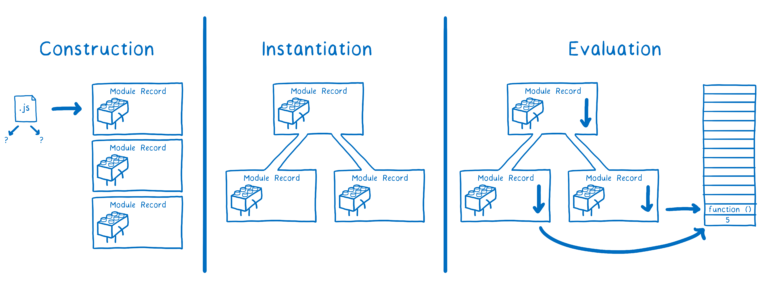
- ES Module的解析过程可以划分为三个阶段
- 阶段一:构建(Construction),
根据地址查找js文件,并且下载,将其解析成模块记录(Module Record) - 阶段二:实例化(Instantiation),对模块记录进行实例化,并且分配内存空间,解析模块的导入和导出语句,把模块指向对应的内存地址。此时模块中的变量值为undefined,函数也没有执行
- 阶段三:运行(Evaluation),运行代码,计算值,并且将值填充到内存地址中
- 阶段一:构建(Construction),
5.9.1. 构建阶段
静态分析文件依赖,查找js文件,解析成Module Record
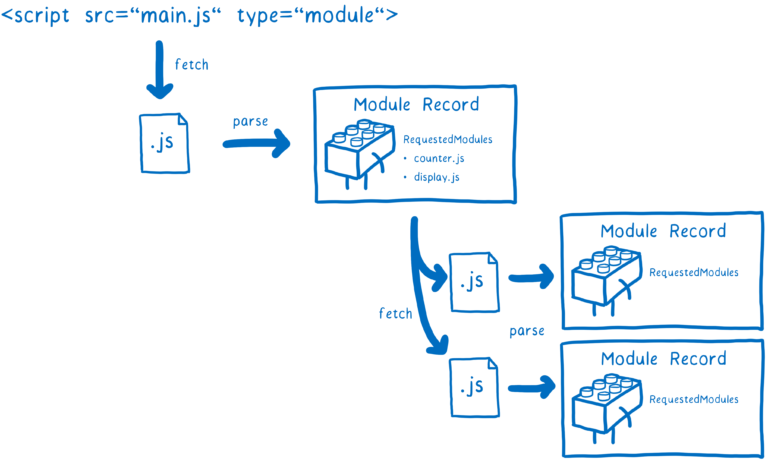
内部维护一个map记录,避免一个文件被多个文件依赖而再次被记录
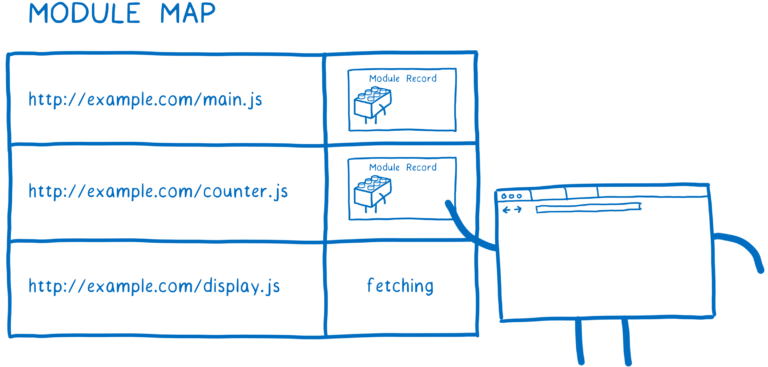
5.9.2. 实例化阶段 – 求值阶段
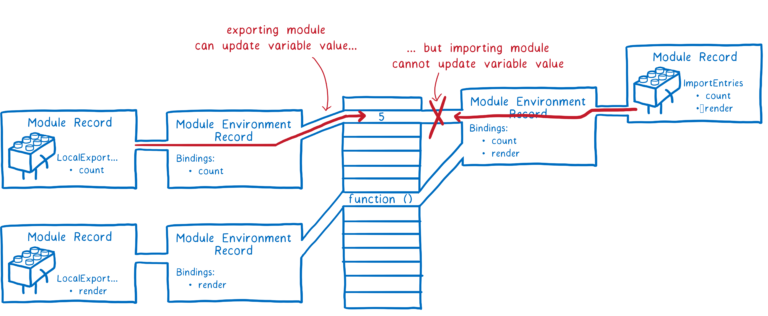
导入的模块中count值不能发生改变,报错Uncaught TypeError: Assignment to constant variable.
main.js
1
2
3
4
5
6
7
8import { count } from "./foo.js";
console.log(count);
// Uncaught TypeError: Assignment to constant variable.
setTimeout(() => {
count = 10;
}, 1000);foo.js
1
2
3
4
5
6
7let count = 5;
setTimeout(() => {
console.log(count);
}, 2000);
export { count };
导出的模块中count值可以发生改变,随之影响导入的模块
main.js
1
2
3
4
5
6
7
8
9import { count } from "./foo.js";
// 5
console.log(count);
// 10
setTimeout(() => {
console.log(count);
}, 2000);foo.js
1
2
3
4
5
6
7let count = 5;
setTimeout(() => {
count = 10;
}, 1000);
export { count };
6. CommonJs和ES Module混用
6.1. 浏览器中不能实现
ES Module在浏览器中可以使用
CommonJS在浏览器中使用会报错
Uncaught ReferenceError: require is not defined
6.2. node中需要命名为x.mjs
CommonJS 在node环境中可以使用
ES Module 在node环境中使用会报错
SyntaxError: Cannot use import statement outside a module,需要将文件命名为xxx.mjs1
2
3
4
5
6
7
8
9
10
11// bar.mjs
export const info = {
name: "why",
age: 18
};
// main.mjs
import { info } from "./bar.mjs";
let { name, age } = info;
// why 18
console.log(name, age);并且 .js文件 和 .mjs 文件不能混用
1
2
3
4
5
6
7
8
9
10
11
12
13
14
15
16// foo.js
export function foo(){
console.log("foo function");
}
// main.mjs
import { foo } from "./foo.js";
export const info = {
name: "why",
age: 18,
foo: foo
}
// main.mjs
import { info } from "./bar.mjs";
info.foo();SyntaxError: Named export 'foo' not found. The requested module './foo.js' is a CommonJS module, which may not support all module.exports as named exports.
6.3. webpack环境中可以混用
生成package.json
1
npm init -y
安装webpack
1
npm install webpack webpack-cli
bar.js 中使用 export 导出,main.js 中使用require()导入
src/bar.js
1
2
3
4
5
6
7const name = "why";
const age = 18;
export {
name,
age
}src/index.js
1
2
3const { name,age } = require("./bar");
console.log(name,age);webpack打包
1
npx webpack --mode=development
在node环境中运行
1
node dist/main.js
在浏览器中运行
1
<script src="./dist/main.js"></script>
都可以得到结果
生成的dist/main.js
1
2
3
4
5
6
7
8
9
10
11
12
13
14
15
16
17
18
19
20
21
22
23
24
25
26
27
28
29
30
31
32
33
34
35
36
37
38
39
40
41
42
43
44
45
46
47
48
49
50
51
52
53
54
55
56
57
58
59
60
61
62
63
64
65
66
67
68
69
70
71
72
73
74
75
76
77
78
79
80
81
82
83
84
85
86
87
88
89
90
91
92
93
94
95
96
97
98
99
100
101
102
103
104
105
106
107
108
109
110
111
112
113
114
115
116(() => {
// webpackBootstrap
var __webpack_modules__ = {
"./src/bar.js":
(
__unused_webpack_module,
__webpack_exports__,
__webpack_require__
) => {
"use strict";
eval(
'__webpack_require__.r(__webpack_exports__);\n/* harmony export */ __webpack_require__.d(__webpack_exports__, {\n/* harmony export */ age: () => (/* binding */ age),\n/* harmony export */ name: () => (/* binding */ name)\n/* harmony export */ });\nconst name = "why";\nconst age = 18;\n\n\n\n//# sourceURL=webpack://commonjs_esmodule/./src/bar.js?'
);
},
"./src/foo.js":
(module) => {
eval(
'function foo(){\n console.log("foo function");\n}\n\nmodule.exports = {\n foo\n}\n\n//# sourceURL=webpack://commonjs_esmodule/./src/foo.js?'
);
},
"./src/index.js":
(
__unused_webpack_module,
__webpack_exports__,
__webpack_require__
) => {
"use strict";
eval(
'__webpack_require__.r(__webpack_exports__);\n/* harmony import */ var _foo__WEBPACK_IMPORTED_MODULE_0__ = __webpack_require__(/*! ./foo */ "./src/foo.js");\n/* harmony import */ var _foo__WEBPACK_IMPORTED_MODULE_0___default = /*#__PURE__*/__webpack_require__.n(_foo__WEBPACK_IMPORTED_MODULE_0__);\nconst { name,age } = __webpack_require__(/*! ./bar */ "./src/bar.js");\n\n\nconsole.log(name,age);\n(0,_foo__WEBPACK_IMPORTED_MODULE_0__.foo)();\n\n//# sourceURL=webpack://commonjs_esmodule/./src/index.js?'
);
}
};
// The module cache
var __webpack_module_cache__ = {};
// The require function
function __webpack_require__(moduleId) {
// Check if module is in cache
var cachedModule = __webpack_module_cache__[moduleId];
if (cachedModule !== undefined) {
return cachedModule.exports;
}
// Create a new module (and put it into the cache)
var module = (__webpack_module_cache__[moduleId] = {
// no module.id needed
// no module.loaded needed
exports: {}
});
// Execute the module function
__webpack_modules__[moduleId](
module,
module.exports,
__webpack_require__
);
// Return the exports of the module
return module.exports;
}
/* webpack/runtime/compat get default export */
(() => {
// getDefaultExport function for compatibility with non-harmony modules
__webpack_require__.n = (module) => {
var getter =
module && module.__esModule
? () => module["default"]
: () => module;
__webpack_require__.d(getter, { a: getter });
return getter;
};
})();
/* webpack/runtime/define property getters */
(() => {
// define getter functions for harmony exports
__webpack_require__.d = (exports, definition) => {
for (var key in definition) {
if (
__webpack_require__.o(definition, key) &&
!__webpack_require__.o(exports, key)
) {
Object.defineProperty(exports, key, {
enumerable: true,
get: definition[key]
});
}
}
};
})();
/* webpack/runtime/hasOwnProperty shorthand */
(() => {
__webpack_require__.o = (obj, prop) =>
Object.prototype.hasOwnProperty.call(obj, prop);
})();
/* webpack/runtime/make namespace object */
(() => {
// define __esModule on exports
__webpack_require__.r = (exports) => {
if (typeof Symbol !== "undefined" && Symbol.toStringTag) {
Object.defineProperty(exports, Symbol.toStringTag, {
value: "Module"
});
}
Object.defineProperty(exports, "__esModule", { value: true });
};
})();
// startup
// Load entry module and return exports
// This entry module can't be inlined because the eval devtool is used.
var __webpack_exports__ = __webpack_require__("./src/index.js");
})();