Number类,Math对象,String类,Array数组,Date类
1. 原始类型的包装类
JavaScript的
原始类型并非对象类型,所以从理论上来说,它们是没有办法获取属性或者调用方法的但是,在开发中会看到这样操作
1
2
3
4
5
6
var message = "Hello World";
var words = message.split(" ");
var length = message.length;
var num = 2.54432;
num = num.toFixed(2);那么,为什么会出现这样奇怪的现象呢?(悖论)
- 原始类型是简单的值,默认并不能调用属性和方法
- 这是因为JavaScript为了可以使其可以获取属性和调用方法,对其封装了对应的包装类型
常见的包装类型有:String、Number、Boolean、Symbol、BigInt类型
2. 包装类型的使用过程
默认情况,当调用一个原始类型的属性或者方法时,会进行如下操作
- 根据原始值,创建一个原始类型对应的包装类型对象
- 调用对应的属性或者方法,返回一个新的值
- 创建的包装类对象被销毁
- 通常JavaScript引擎会进行很多的优化,它可以跳过创建包装类的过程在内部直接完成属性的获取或者方法的调用
也可以自己来创建一个包装类的对象
- name1是字面量(literal)的创建方式,name2是new创建对象的方式
1
2
3
4
5
6
7
8
9
var name1 = "why";
var name2 = new String("why");
// string
console.log(typeof name1);
// object
console.log(typeof name2);
// false
console.log(name1 === name2);注意事项:null、undefined没有任何的方法,也没有对应的“对象包装类”
3. Number类
Number类型,它有一个对应的数字包装类型Number
1
2
3
4
5
6
// Number构造函数 -> window.Number
// num = new Number(123);
var num = 123;
// function
console.log(typeof Number);更多Number的知识,可以查看MDN文档
3.1. Number属性
- ECMAScript并不能表示世界上所有的数值
3.1.1. MIN_VALUE
- 可以表示的最小数值
1 | // 5e-324 |
3.1.2. MAX_VALUE
- 可以表示的最大数值
1 | // 1.7976931348623157e+308 |
3.1.3. MAX_SAFE_INTEGER
- 最大的安全整数 ($2^{53}$ - 1)
3.1.4. MIN_SAFE_INTEGER
- 最小的安全整数 -($2^{53}$ - 1)
3.1.5. 无穷值
1 | // -Infinity |
3.2. Number实例方法
3.2.1. toString(base)
将数字转成字符串,并且按照base进制进行转化
1
2
3
4var age = 18;
var ageAsString = age.toString();
// string
console.log(typeof ageAsString);- base 的范围可以从 2 到 36,默认情况下是 10
1
2
3
4
5
6
7
8
9
10
11
12
13var age = 18;
// 18
console.log(age.toString());
// 10010
console.log(age.toString(2));
// 200
console.log(age.toString(3));
// 22
console.log(age.toString(8));
// 18
console.log(age.toString(10));
// 12
console.log(age.toString(16));注意:如果是直接对一个数字操作,需要使用..运算符
1
var str = 123..toString();
3.2.2. toFixed(digits)
- 格式化一个数字,保留digits位的小数,返回类型为string字符串
- 保留的小数是四舍五入的结果
- digits的范围是0到20(包含)之间
1 | var pi = 3.1415926; |
3.3. Number类方法
Number(),Number.parseInt(),Number.parseFloat()都可以将非数值转换为数值
Number() 可用于任何数据类型
Number.parseInt() 解析成整数,有对应全局方法parseInt()
Number.parseFloat() 解析成浮点数,有对应全局方法parseFloat()
3.3.1. Number(string)
布尔值:true转换为1,false转换为0
数值:直接返回
null:返回0
Undefined:返回NaN
字符串:
包含数值字符,包括加,减号,转换为十进制数值
如果数值前缀为0,则会被忽略
1
2
3
4
5var num = Number("011");
// 11
console.log(num);
// number
console.log(typeof num);包含有效二进制格式0b,十六进制格式0x,八进制格式0o,转换为对应十进制整数值
1
2
3
4
5
6
7
8
9
10
11var num1 = Number("0b11");
// 3
console.log(num1);
var num2 = Number("0x11");
// 17
console.log(num2);
var num3 = Number("0o11");
// 9
console.log(num3);包含有效浮点值格式,转换为浮点值
1
2
3
4
5var num = Number("1.1");
// 1.1
console.log(num);
// number
console.log(typeof num);空字符串,转换为0
1
2
3
4
5var num = Number("");
// 0
console.log(num);
// number
console.log(typeof num);包含其他字符,转换为NaN
1
2// NaN
console.log(Number("1a"));
对象:调用valueOf(),如果转换结果为NaN,则调用toString()按照字符串规则转换
3.3.2. parseInt(string[, radix])
更专注于字符串是否包含数值模式
忽略字符串两边空格后如果判断字符串第一个字符不是数值字符/+/-,则立即返回NaN
空字符串,布尔值都会返回NaN
接着继续向后检测字符,直到末尾或碰到非数值字符
1
2
3
4
5
6
7
8
9
10// NaN
console.log(Number.parseInt(""));
// NaN
console.log(Number.parseInt(true));
// 1234
console.log(Number.parseInt("1234blue"));
// 22
console.log(Number.parseInt("22.5"));能识别以“0x”开头的十六进制整数格式
1
2
3
4
5
6
7
8// 10
console.log(Number.parseInt("0xA"));
// 0
console.log(Number.parseInt("0b11"));
// 0
console.log(Number.parseInt("0o70"));
// 70
console.log(Number.parseInt("070"));接收的第二个参数,用于指定进制数
- 解析一个字符串并返回指定基数radix的十进制整数
1
2
3
4
5
6
7
8// 6
console.log(Number.parseInt("110",2));
// 56
console.log(Number.parseInt("70",8));
// 10
console.log(Number.parseInt("10",10));
// 175
console.log(parseInt("af",16));内部方法会被加载到window对象中,故
Number.parseInt有对应的全局方法parseInt1
2
3
4
5
6
7
8
9
10
11function MyNumber(){}
myNumber.parseInt2 = function(){}
window.parseInt2 = MyNumber.parseInt2;
// true
console.log(window.parseInt2 === MyNumber.parseInt2 );
// true
console.log(window.parseInt === Number.parseInt);
// true
console.log(Number.parseInt === parseInt);
3.3.3. parseFloat(string)
parseFloat()和parseInt()工作方式类似
- 从参数字符串位置0开始检测每个字符
- 解析到字符串末尾或解析到无效的浮点数值字符为止
- 第一次出现小数点是有效的,第二次出现小数点就无效,此后剩余字符都被忽略
1
2
3
4
5
6
7
8//22.34
console.log(Number.parseFloat("22.34.5"));
// 1234
console.log(Number.parseFloat("1234blue"));
// NaN
console.log(Number.parseFloat(false));parseFloat()和parseInt()不同的是parseFloat() 始终忽略字符串开头的零
- parseFloat() 就无法识别十六进制数
1
2
3
4
5
6
7
8// 0
console.log(Number.parseFloat("0xA"));
// 908.5
console.log(Number.parseFloat("0908.5"));
// 31250000
console.log(Number.parseFloat("3.125e7"));
4. Math对象
在除了Number类可以对数字进行处理之外,JavaScript还提供了一个Math对象
- Math是一个内置对象(不是一个构造函数),它拥有一些数学常数属性和数学函数方法
1
2
3
4// object
console.log(typeof Math);
// TypeError: Math is not a constructor
// new Math();
4.1. Math常见的属性
- Math.PI:圆周率,约等于 3.14159
4.2. Math常见的方法
Math.floor:向下舍入取整
Math.ceil:向上舍入取整
Math.round:四舍五入取整
Math.random:生成0~1的随机数(包含0,不包含1)
生成[a,b]之间的整数
1
Math.floor(Math.random()*(b-a+1))+a
Math.pow(x, y):返回x的y次幂
| 数字 | Math.floor | Math.ceil | Math.round |
|---|---|---|---|
| 3.1 | 3 | 4 | 3 |
| 3.6 | 3 | 4 | 4 |
- Math中还有很多其他数学相关的方法,可以查看 MDN文档
5. String类
- 在开发中,经常需要对字符串进行各种各样的操作,String类提供给了对应的属性和方法
5.1. String常见的属性
length:获取字符串的长度
1
var len = str1.length;
5.2. String常见的方法和操作
- 可以查看 MDN的文档
5.2.1. String()
- 始终返回类型值的字符串
- 值有toString()方法,调用不传参数的toString()方法并返回结果
- 值为null,返回“null”
- 值为undefined,返回“undefined”
1 | var value1 = 18; |
- 数值,布尔值转换结果与toString()的相同,null和undefined因没有toString()方法直接返回值的字面量文本
5.2.2. 访问字符串的字符
- 使用方法一:通过字符串的索引 str[0]
- 使用方法二:通过str.charAt(pos)方法
- 它们的区别是索引的方式没有找到会返回undefined,而charAt没有找到会返回空字符串
5.2.3. 字符串的遍历
方式一:普通for循环
1
2
3
4var message = "Hello World";
for (var i = 0; i < message.length; i++) {
console.log(message[i]);
}方式二:for..of遍历
- 对象不支持for..of
- String对象内部将字符串变成了一个可迭代对象
1
2
3for (var m of message) {
console.log(m);
}
5.2.4. 修改字符串
字符串的不可变性
字符串在定义后是
不可以修改的,所以下面的操作是没有任何意义的1
2
3
4var message = "Hello World";
message[1] = "A";
// Hello World
console.log(message);
在改变很多字符串的操作中,都是生成了一个新的字符串
- 比如改变字符串大小的两个方法
- toLowerCase():将所有的字符转成小写
- toUpperCase() :将所有的字符转成大写
1
2
3
4
5var message = "Hello World";
// hello world
console.log(message.toLowerCase());
// HELLO WORLD
console.log(message.toUpperCase());
5.2.5. 查找字符串位置
str.indexOf(searchValue[,fromIndex])
- 从fromIndex开始,查找searchValue的索引
- 如果没有找到,那么返回-1
1 | var message = "Hello World! My name is John"; |
5.2.6. 是否包含字符串
str.includes(searchString[, position])
- 这是ES6新增的方法
- 从position位置开始查找searchString, 根据情况返回 true 或 false
1 | var message = "Hello World! My name is John"; |
5.2.7. 是否以xxx开头
str.startsWith(searchString[, position])
- 这是ES6新增的方法
- 从position位置开始,判断字符串是否以searchString开头
1 | var message = "Hello World! My name is John"; |
5.2.8. 是否以xxx结尾
str.endsWith(searchString[, length])
- 在length长度内,判断字符串是否以searchString结尾
1 | var message = "Hello World! My name is John"; |
5.2.9. 替换字符串
str.replace(regexp|substr, newSubStr|function)
查找到对应的字符串,并且使用新的字符串进行替代
1
2
3
4var message = "Hello World! My name is John";
// Hello World! My name is Kobe
console.log(message.replace("John","Kobe"));也可以传入一个正则表达式来查找,也可以传入一个函数来替换
1
2
3
4
5
6// 使用函数
var newName = message.replace("John",function (str) {
return str.toUpperCase();
})
// Hello World! My name is JOHN
console.log(newName);
5.2.10. 获取子字符串
| 方法 | 选择方式 | 负值参数 |
|---|---|---|
| slice(start, end) | 从 start 到 end(不含 end) | 当成字符串长度加上负参数值 |
| substring(start, end) | 从 start 到 end(不含 end) | 所有负参数值转换为0 |
| substr(start, length) | 从 start 开始获取长为 length 的字符串 | 第一个负参数值当成字符串长度加上该值 第二个负参数值转换为0 |
- 开发中推荐使用slice方法
1 | var message = "Hello World"; |
5.2.11. 拼接字符串
str.concat(str2, [, ... strN])
- 该方法可以链式调用
1 | // HelloWorldJavaScript |
5.2.12. 删除首尾空格
str.trim()
1 | // Hello |
5.2.13. 字符串分割
str.split([separator[, limit]])
- separator:以什么字符串进行分割,也可以是一个正则表达式
- limit:限制返回片段的数量
1 | var message = "my name is coder"; |
5.2.14. 字符串连接
str.join(separator)
1 | var message = "my name is coder"; |
5.2.15. 字符串补全
str.padStart(targetLength [, padString])
- 在字符串的开头填充指定的字符,直到字符串达到指定的长度
targetLength:目标字符串的长度。如果该值小于或等于原字符串的长度,则返回原字符串padString: 用于填充的字符串。如果未指定,默认使用空格字符
1 | // hello |
常用于处理日期、时间等需要固定长度的字符串
1 | function padLeft(content,count,padStr) { |
6. 数组(Array)
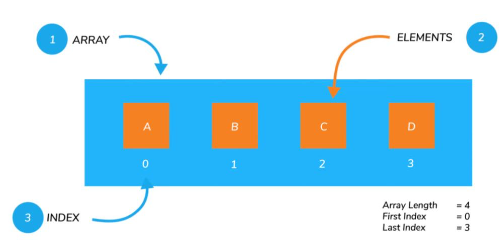
什么是数组(Array)
- 对象允许存储键值集合,但是在某些情况下使用键值对来访问并不方便
- 比如说一系列的商品、用户、英雄,包括HTML元素,如何将它们存储在一起?
- 这个时候需要一种有序的集合,里面的元素是按照某一个顺序来排列的
- 这个
有序的集合,可以通过索引来获取到它 - 这个结构就是数组(Array)
数组和对象都是一种保存多个数据的数据结构
可以通过[]来创建一个数组
- 数组是一种特殊的对象类型
1
var letters = ["a","b","c","d"];
6.1. 数组的创建方式
创建一个数组有两种语法
1
2var arr1 = ["why","kobe","james"];
var arr2 = new Array("abc","cba","nba");下面的方法是在创建一个数组时,设置数组的长度(很少用)
1
2
3var arr3 = new Array(5);
// [ <5 empty items> ]
console.log(arr3);数组元素从 0 开始编号(索引index)
- 一些编程语言允许使用负数索引来实现这一点,例如 fruits[-1]
- JavaScript
并不支持这种写法
6.2. 数组的基本操作
访问数组中的元素
- 通过中括号[]访问
- arr.at(i)
- 如果 i >= 0,则与 arr[i] 完全相同
- 对于 i 为负数的情况,它则从数组的尾部向前数
1
2
3
4
5var arr = ["why","kobe","james"];
// undefined
console.log(arr[-1]);
// james
console.log(arr.at(-1));修改数组中的元素
1
arr[0] = "Hello";
删除和添加元素虽然也可以通过索引来直接操作,但是开发中很少这样操作
- 会有空位置出现
1
2
3
4
5
6
7arr[10] = "aaa";
// [ 'why', 'kobe', 'james', <7 empty items>, 'aaa' ]
console.log(arr);
delete arr[1];
// [ 'why', <1 empty item>, 'james', <7 empty items>, 'aaa' ]
console.log(arr);
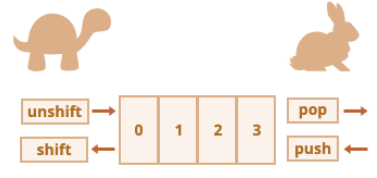
6.3. 数组的添加、删除
6.3.1. 在尾端添加或删除元素
push 在末端添加元素
1
2var arr = ["why","kobe","james"];
arr.push("abc","cba");pop 从末端取出一个元素
1
2var arr = ["why","kobe","james"];
arr.pop();
6.3.2. 在首端添加或删除元素
shift 取出队列首端的一个元素,整个数组元素前移
1
2var arr = ["why","kobe","james"];
arr.shift();unshift 在首端添加元素,整个其他数组元素后移
1
2var arr = ["why","kobe","james"];
arr.unshift("curry");push/pop 方法运行的比较快,而 shift/unshift 比较慢
6.3.3. 在中间位置添加或删除元素
arr.splice 方法可以说是处理数组的利器,它可以做所有事情:添加,删除和替换元素
arr.splice的语法结构如下
array.splice(start[, deleteCount[, item1[, item2[, ...]]]])- 从start位置开始,处理数组中的元素
- deleteCount:要删除元素的个数,如果为0或者负数表示不删除
- item1, item2, …:在添加元素时,需要添加的元素
1
2
3
4
5
6
7
8
9var arr = ["why","kobe","james"];
// 删除一个元素
arr.splice(1,1);
// 新增两个元素
arr.splice(1,0,"abc","cba");
// 替换两个元素
arr.splice(1,2,"kobe","curry");
6.4. length属性
length属性用于获取数组的长度
- 当修改数组的时候,length 属性会自动更新
length 属性的另一个有意思的点是它是可写的
- 如果手动增加一个大于默认length的数值,那么会增加数组的长度
- 但是如果减少它,数组就会被截断
1
2
3
4
5
6
7
8
9var arr = ["why","kobe","james"];
arr.length = 10;
// [ 'why', 'kobe', 'james', <7 empty items> ]
console.log(arr);
arr.length = 2;
// [ 'why', 'kobe' ]
console.log(arr);所以,清空数组最简单的方法就是
arr.length = 0
6.5. 数组的遍历
普通for循环遍历
1
2
3
4var arr = ["why","kobe","james"];
for (var i = 0; i < arr.length; i++) {
console.log(arr[i]);
}for..in 遍历,获取到索引值
1
2
3for (const key in arr) {
console.log(arr[key]);
}for..of 遍历,获取到每一个元素
1
2
3for (const item of arr) {
console.log(item);
}
6.6. 数组方法
6.6.1. slice
arr.slice([begin[, end]])
- 用于对数组进行截取(类似于字符串的slice方法)
- 包含begin元素,但是不包含end元素
1 | var arr = ["why","kobe","james"]; |
6.6.2. concat
1 | var new_array = old_array.concat(value1[, value2[, ...[,valueN]]]); |
- 创建一个新数组,其中包含来自于其他数组和其他项的值
1 | var arr = ["why","kobe","james"]; |
6.6.3. join
arr.join([separator]);
- 将一个数组的所有元素连接成一个字符串并返回这个字符串
1 | var arr = ["why","kobe","james"]; |
6.6.4. indexOf
arr.indexOf(searchElement[, fromIndex]);
查找某个元素的索引
从fromIndex开始查找,如果找到返回对应的索引,没有找到返回-1
也有对应的从最后位置开始查找的 lastIndexOf 方法
1 | var arr = ["why","kobe","james"]; |
6.6.5. includes
arr.includes(valueToFind[, fromIndex]);
判断数组是否包含某个元素
从索引 from 开始搜索 item,如果找到则返回 true(如果没找到,则返回 false)
6.6.6. find和findIndex
- 如果数组中存放的是对象时,可以直接查找元素或者元素的索引(ES6之后新增的语法)
1 | var students = [ |
自实现find
1 | Array.prototype.myFind = function(fn){ |
6.6.7. sort
arr.sort([compareFunction]);
sort方法是一个高阶函数,用于对数组进行排序,并且生成一个排序后的新数组
如果 compareFunction(a, b) 小于 0 ,那么 a 会被排列到 b 前面
如果 compareFunction(a, b) 等于 0 , a 和 b 的相对位置不变
如果 compareFunction(a, b) 大于 0 , b 会被排列到 a 前面
也就是说,谁小谁排在前面
1
2
3
4
5
6
7
8
9
10
11
12
13
14
15
16
17var students = [
{ id: 98, score: 99 },
{ id: 99, score: 90 },
{ id: 100, score: 89 }
];
var newStu = students.sort(function(item1,item2){
return item1.score - item2.score;
});
/**
[
{ id: 100, score: 89 },
{ id: 99, score: 90 },
{ id: 98, score: 99 }
]
*/
console.log(newStu);实现从大到小排序
1
2
3
4
5
6
7
8
9
10
11var newStu = students.sort(function(item1,item2){
return item2.score - item1.score;
});
/**
[
{ id: 98, score: 99 },
{ id: 99, score: 90 },
{ id: 100, score: 89 }
]
*/
console.log(newStu);
6.6.8. reverse
将数组中元素的位置颠倒,并返回该数组
可用于实现sort()的从大到小排序
1
2
3var newStu = students.sort(function(item1,item2){
return item1.score - item2.score;
}).reverse();
6.6.9. forEach
- 遍历数组,并且让数组中每一个元素都执行一次对应的方法
1 | /** |
自实现forEach
1 | Array.prototype.myForEach = function(fn){ |
6.6.10. map
- 创建一个新数组
- 这个新数组由原数组中的每个元素都调用一次提供的函数后的返回值组成
1 | var arr = ["why","kobe","james"]; |
6.6.11. filter
- 创建一个新数组
- 新数组中只包含每个元素调用函数返回为true的元素
1 | var arr = ["why","kobe","james"]; |
6.6.12. reduce
1 | reduce(callbackfn: (previousValue: number, currentValue: number, currentIndex: number, array: number[]) => number, initialValue: number): number |
- 用于计算数组中所有元素的总值
- 对数组中的每个元素按序执行提供的 callbackfn函数
- 每一次运行callbackfn会将先前元素的计算结果作为参数传入,最后将其结果汇总为单个返回值
1 | var arr = [3,2,1]; |
如果没有初始值,第一个执行的初始值为数组第一项
1 | var arr = [3,2,1]; |
6.6.13. filter&map&reduce
1 | var arr = [1,2,6,8,11,13]; |
7. Date类
7.1. 时间的表示方式
- 时间表示的基本概念
- 最初,通过观察太阳的位置来决定时间的,但是这种方式有一个最大的弊端就是不同区域位置大家使用的时间是不一致的
- 相互之间没有办法通过一个统一的时间来沟通、交流
- 之后,制定的标准时间是英国伦敦的皇家格林威治( Greenwich )天文台的标准时间(刚好在本初子午线经过的地方),这个时间也称之为GMT(Greenwich Mean Time)
- 其他时区根据标准时间来确定自己的时间,往东的时区(GMT+hh:mm),往西的时区(GMT+hh:mm)
- 最初,通过观察太阳的位置来决定时间的,但是这种方式有一个最大的弊端就是不同区域位置大家使用的时间是不一致的
- 但是,根据公转有一定的误差,也会造成GMT的时间会造成一定的误差,于是就提出了根据原子钟计算的标准时间UTC(Coordinated Universal Time)
- 目前GMT依然在使用,主要表示的是某个时区中的时间,而
UTC是标准的时间
7.2. 创建Date对象
- 在JavaScript中使用Date来表示和处理时间
7.2.1. 当前时间
1 | var date = new Date(); |
7.2.2. Unix时间戳
- 传入的是毫秒数,表示从1970-01-01 00:00:00 UTC经过的毫秒数
1 | var date = new Date(1000); |
7.2.3. 时间字符串值
1 | var date = new Date("2000-01-01"); |
7.2.4. 具体的年月日时分秒毫秒
new Date(year, monthIndex[, day[, hours[, minutes[, seconds[, milliseconds]]]]])
月的索引是从0开始的,0-11
1 | var date = new Date(2000,01,01,01,01,01,01); |
7.3. 时间的表示方式
日期的表示方式有两种
- RFC 2822 标准
- ISO 8601 标准
默认打印的时间格式是RFC 2822标准的
1
2
3var date = new Date();
// Fri Feb 08 2019 15:20:00 GMT+0800 (中国标准时间)
console.log(date);也可以将其转化成
ISO 8601标准的1
2
3date = new Date().toISOString();
// 2019-02-08T15:21:00.360Z
console.log(date);- YYYY:年份,0000 ~ 9999
- MM:月份,01 ~ 12
- DD:日,01 ~ 31
- T:分隔日期和时间,没有特殊含义,可以省略
- HH:小时,00 ~ 24
- mm:分钟,00 ~ 59
- ss:秒,00 ~ 59
- sss:毫秒
- Z:时区
7.4. Date获取信息的方法
从Date对象中获取各种详细的信息
- getFullYear():获取年份(4 位数)
- getMonth():获取月份,从 0 到 11
- getDate():获取当月的具体日期,从 1 到 31(方法名字有点迷)
- getHours():获取小时
- getMinutes():获取分钟
- getSeconds():获取秒钟
- getMilliseconds():获取毫秒
获取某周中的星期几
- getDay():获取一周中的第几天,从 0(星期日)到 6(星期六)
7.5. 时间格式化函数
1 | function padLeftZero(str) { |
7.6. Date设置信息的方法
Date也有对应的设置方法
- setFullYear(year, [month], [date])
- setMonth(month, [date])
- setDate(date)
- setHours(hour, [min], [sec], [ms])
- setMinutes(min, [sec], [ms])
- setSeconds(sec, [ms])
- setMilliseconds(ms)
- setTime(milliseconds)
可以设置超范围的数值,它会自动校准
7.7. Date获取Unix时间戳
Unix 时间戳:它是一个整数值,表示自1970年1月1日00:00:00 UTC以来的毫秒数
在JavaScript中,有多种方法可以获取这个时间戳
- new Date().getTime()
- new Date().valueOf()
- +new Date()
- Date.now()
获取到Unix时间戳之后,可以利用它来测试代码的性能
- 双层循环的执行时间
1
2
3
4
5
6
7
8
9
10
11var startTime = new Date().getTime();
var sum = 0;
for (var i = 1; i <= 1000; i++) {
for (var j = 1; j <= 1000; j++) {
sum += i*j;
}
}
var endTime = new Date().getTime();
console.log(endTime-startTime);
7.8. Date.parse
- Date.parse(str) 方法可以从一个字符串中读取日期,并且输出对应的Unix时间戳
- Date.parse(str)
- 作用等同于
new Date(dateString).getTime()操作 - 需要符合 RFC2822 或 ISO 8601 日期格式的字符串
- 比如YYYY-MM-DDTHH:mm:ss.sssZ
- 其他格式也许也支持,但结果不能保证一定正常
- 如果输入的格式不能被解析,那么会返回NaN
- 作用等同于
1 | var time = Date.parse("2019-02-08T15:21:00.360Z"); |