前端-CSS学习笔记20-考拉移动端实战

考拉移动端网页

1. 整体代码

  • 采用宽375px为样本,全程计量单位为vw
  • 采用less预处理css

kaola.zip

2. 公共样式

2.1. variables.less

  • 定义网页使用的字体,颜色
1
2
3
4
5
@normalFontSize: 3.7333vw;
@smallFontSize: 3.2vw;
@bigFontSize: 4.2667vw;
@mainColor: #e31436;
@textColor: #f7261d;

2.2. reset.less

  • 初始化一些元素
1
2
3
4
5
6
7
8
9
10
11
12
13
14
15
16
17
18
19
20
21
22
body,div,ul,li,input,a,img,p {
margin: 0;
padding: 0;
}
body {
background-color: #f5f5f5;
overflow-y: auto;
}
ul,li {
list-style: none;
}
a {
text-decoration: none;
outline: none;
}
input {
border: none;
outline: none;
}
img {
vertical-align: top;
}

2.3. mixins.less

  • 定义一些公用样式
1
2
3
4
5
6
7
8
9
10
11
12
13
14
15
16
17
18
19
20
21
22
23
24
25
26
@import url(./variables);
.nowrap {
white-space: nowrap;
text-overflow: ellipsis;
overflow: hidden;
}

.twolines {
display: -webkit-box;
overflow: hidden;
-webkit-line-clamp: 2;
-webkit-box-orient: vertical;
}

.price {
font-size: 2.66667vw;
color: @textColor;
span {
font-size: 4vw;
font-weight: 700;
}
.icon {
font-size: 3.2vw;
padding: 0 .8vw;
}
}

3. .topbar

1
2
3
4
5
6
7
8
<!-- 搜索栏 -->
<div class="topbar">
<div class="search">
<img src="./img/search.png" alt="" class="icon">
<input type="text" placeholder="在千万海外商品中搜索">
</div>
<div class="button">登录/注册</div>
</div>

  • 整个div.topbar元素固定定位在网页头部,宽度为100%,高度为60px
  • 内部有div.search,div.button元素,在div.search中垂直居中
    • div.button元素宽度固定为60px,div.search元素宽度占满剩余宽度
1
2
3
4
5
6
7
8
9
10
11
12
.topbar {
position: fixed;
left: 0;
right: 0;
top: 0;
display: flex;
align-items: center;
height: 10.6667vw;
padding: 0 3.2vw;
background-color: #fff;
z-index: 999;
}

  • div.search元素内部有img,input元素,两者垂直居中
  • img元素固定宽度12px,input元素则占满剩余宽度
  • :placeholder-shown 用于设置input的占位符样式
1
2
3
4
5
6
7
8
9
10
11
12
13
14
15
16
17
18
19
20
21
22
23
24
.search {
display: flex;
align-items: center;
flex: 1;
padding-right: 3.2vw;
box-sizing: border-box;
border: 1px solid @mainColor;
border-radius: 10.6667vw;

.icon {
width: 3.2vw;
height: 3.2vw;
margin: 0 2.9333vw 0 2.66667vw;
}

input {
flex: 1;
line-height: 7.4667vw;
}
input:placeholder-shown {
font-size: 3.4667vw;
color: #999;
}
}

3.2. .button

1
2
3
4
5
6
7
8
9
10
11
12
13
.button {
width: 16vw;
height: 7.4667vw;
box-sizing: border-box;
border: 1px solid @mainColor;
border-radius: .8vw;
margin-left: 2.6667vw;
font-size: @smallFontSize;
text-align: center;
line-height: 7.4667vw;
color: @mainColor;
.nowrap();
}

4. .icon-slider

1
2
3
4
5
6
7
8
9
<!-- 图标栏 -->
<ul class="icon-slider">
<li>
<a href="#" class="item">
<img src="./img/icon-slider/dou.png" alt="">
</a>
</li>
...
</ul>

  • 5个li元素刚好平分整个ul宽度,则每个li元素宽度为75px
  • 因为上边的div.topbar元素是固定定位,已脱离标准流,网页布局div.icon-slider元素就会从top:0的位置开始,导致div.icon-slider元素被div.topbar元素覆盖。就需要设置div.icon-slider元素外上边距40px,刚好是div.topbar的高度
  • 为了a元素内部img拥有75px宽度,将a元素设为块级元素,让a元素拥有100%父元素li的宽度
1
2
3
4
5
6
7
8
9
10
11
12
13
14
15
.icon-slider {
display: flex;
margin-top: 10.6667vw;
li {
flex: 1;
height: 20.8333vw;
text-align: center;
a {
display: block;
}
img {
width: 100%;
}
}
}

5. .allowance

1
2
3
4
5
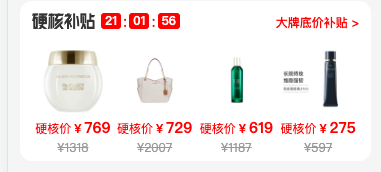
<!-- 硬核补贴 -->
<div class="allowance">
<div class="header">...</div>
<ul class="info">...</ul>
</div>

  • div.allowance元素整个外边距12px,内边距12px,还有圆角12px
  • 内部有div.header,div.info两个元素,垂直布局
1
2
3
4
5
6
.allowance {
padding: 0 3.2vw;
border-radius: 3.2vw;
margin: 3.2vw;
background-color: #fff;
}
1
2
3
4
5
6
7
8
9
10
11
12
13
14
15
<div class="header">
<div class="left">
<img src="./img/allowance/title.png" alt="">
<div class="time">
<span class="coutdown">21</span>
<span class="split">:</span>
<span class="coutdown">01</span>
<span class="split">:</span>
<span class="coutdown">56</span>
</div>
</div>
<div class="right">
<a href="#">大牌底价补贴 &gt;</a>
</div>
</div>

  • div.header元素有div.left,div.right元素组成,两者贴边且垂直居中
  • div.left元素是img,div.time元素,两者水平排布,但也垂直居中
    • img明确宽高63x16
    • div.time元素应该结合js实现倒计时
1
2
3
4
5
6
7
8
9
10
11
12
13
14
15
16
17
18
19
20
21
22
23
24
25
26
27
28
29
30
31
32
33
34
35
36
37
38
39
.header {
display: flex;
justify-content: space-between;
align-items: center;
height: 10.66667vw;
color: @textColor;

.left {
display: flex;
align-items: center;

img {
width: 16.8vw;
height: 4.26667vw;
margin-right: 1.6vw;
}
.time {
display: flex;
height: 4.4vw;
line-height: 4.4vw;
.coutdown {
padding: 0 1.0667vw;
border-radius: 0.8vw;
background-color: @textColor;
font-size: @smallFontSize;
font-weight: 700;
color: #fff;
}
.split {
margin: 0 .5333vw;
}
}
}
.right a {
font-family: PingFangSC-Medium;
font-size: @smallFontSize;
color: @textColor;
}
}

5.2. .info

1
2
3
4
5
6
7
8
9
10
<ul class="info">
<li>
<a href="#" class="item">
<img src="./img/allowance/01.jpeg" alt="">
<p class="new">硬核价<span class="icon">&yen;</span><span>769</span></p>
<p class="old">&yen;1318</p>
</a>
</li>
...
</ul>

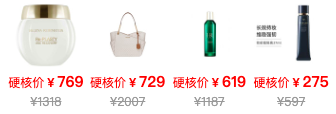
  • 4个li元素刚好平分整个ul宽度
1
2
3
4
5
6
7
8
9
10
11
12
13
14
15
16
17
18
19
20
21
22
23
.info {
display: flex;
li {
flex: 1;
margin: 0 0.8vw 1.3333vw;
.item {
display: block;
text-align: center;
img {
width: 20.93333vw;
}
.new {
margin-bottom: 0.26667vw;
.price();
}
.old {
font-size: @smallFontSize;
color: #999;
text-decoration: line-through;
}
}
}
}

6. .tabbar

1
2
3
4
5
6
7
8
9
<!-- 底部导航栏 -->
<ul class="tabbar">
<li>
<a href="#" class="item">
<img src="./img/tabbar/index-active.png">
</a>
</li>
...
</ul>

  • div.tabbar元素在视口固定定位,已脱标
    • 高度设置中的 env(safe-area-inset-bottom)表示像iphone等手机中可能有主导航下划线(用于返回主页,唤出多软件等),会加上这一段高度
  • 4个li元素平分ul宽度,li元素内部a元素为块级元素,占满整个li元素的宽高
1
2
3
4
5
6
7
8
9
10
11
12
13
14
15
16
17
18
19
20
21
22
.tabbar {
position: fixed;
left: 0;
right: 0;
bottom: 0;
display: flex;
justify-content: center;
height: calc( env(safe-area-inset-bottom) + 50px);
border-top: 1px solid #ddd;
background-color: #fff;
z-index: 999;
li {
flex-grow: 1;
text-align: center;
}
.item {
display: block;
img {
width: 48px;
}
}
}

7. .main

1
2
3
4
<div class="main">
<ul class="nav">...</ul>
<div class="content">...</div>
</div>

  • div.main元素左右两边的外边距跟div.allowance一样,下边距是因为div.tabbar元素脱标导致div.tabbar元素显示的时候会覆盖在div.main元素之上
  • div.main元素内部有ul.nav,div.content元素
    • 应该使用js实现点击导航切换div.content中的内容
1
2
3
.main {
margin: 0 3.2vw 16.5333vw;
}
1
2
3
4
5
6
7
<ul class="nav">
<li class="item active">
<span class="title">精选</span>
<span class="sub-title">猜你喜欢</span>
</li>
...
</ul>

  • 5个li元素平分整个ul元素的宽度,li元素内部span元素水平居中
  • 设置active类,在选中某个li元素时改变样式
1
2
3
4
5
6
7
8
9
10
11
12
13
14
15
16
17
18
19
20
21
22
23
24
25
26
27
28
.nav {
display: flex;
padding-top: 3.2vw;
.item {
flex: 1;
text-align: center;
span {
display: block;
}
.title {
font-family: PingFangSC-Semibold;
font-size: 4.26667vw;
color: #666;
}
.sub-title {
font-size: @smallFontSize;
color: #999;
}
&.active .title{
color: red;
}
&.active .sub-title {
border-radius: 2.4vw;
color: #fff;
background-image: linear-gradient(90deg,red,#ff3164);
}
}
}

7.2. .content

1
2
3
4
5
6
7
8
9
10
11
12
13
14
15
16
17
18
19
20
21
22
23
24
25
<div class="content">
<div class="item">
<a href="#">
<img src="./img/main/01.jpeg" class="photo">
<div class="news">
<div class="brand">
<img src="./img/main/country01.png" alt="">
<span>雅诗兰黛</span>
</div>
<div class="title">
<img src="./img/main/icon.png" alt="">
【第7代小棕瓶】ESTĒE LAUDER 雅诗兰黛 特润修护肌活精华露 100毫升
</div>
<div class="info">
<span>下单立减270元</span>
<span>包税</span>
</div>
<div class="price">
优惠价<span class="icon">&yen;</span><span>629</span>
</div>
</div>
</a>
</div>
...
</div>

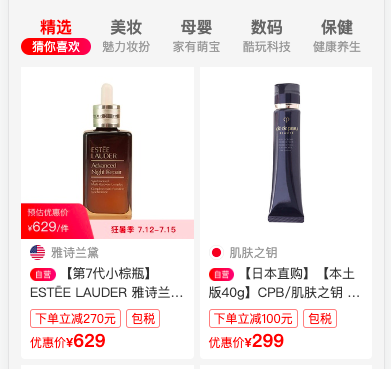
  • 整个div.content元素flex布局,允许多行flex-wrap:wrap,有多个div.item元素
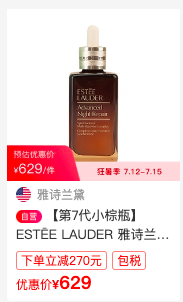
  • div.item元素由一个块级元素a组成,a元素中img,div.news元素
    • 设置div.news元素是为了div.brand,div.title,div.info,div.price元素拥有相同的左右边距
    • div.brand元素是img+span元素,两者垂直居中
    • div.title元素是img+文字,两者居中对齐。文字是显示两行,多余以…表示
    • div.price元素样式跟div.icon-slider元素中的div.price元素样式差不多
1
2
3
4
5
6
7
8
9
10
11
12
13
14
15
16
17
18
19
20
21
22
23
24
25
26
27
28
29
30
31
32
33
34
35
36
37
38
39
40
41
42
43
44
45
46
47
48
49
50
51
52
53
54
55
56
57
58
59
60
61
62
63
64
65
66
67
68
69
70
71
72
73
.content {
display: flex;
flex-wrap: wrap;
margin-top: 1.6vw;
margin-right: -1.6vw;
.item {
width: 46vw;
box-sizing: border-box;
border-radius: 1.06667vw;
margin: 1.6vw 1.6vw 0 0;
background-color: #fff;
a {
display: block;
width: 100%;
}
.photo {
width: 100%;
margin-bottom: 1.6vw;
}
.news {
margin: 0 2.4vw 1.6vw;
}
.brand {
display: flex;
align-items: center;
height: 4vw;
margin-bottom: 1.06667vw;
img {
width: 4vw;
height: 4vw;
margin-right: 1.6vw;
vertical-align: middle;
}
span {
font-size: @smallFontSize;
color: #999;
}
}
.title {
height: 9.86667vw;
line-height: 4.93333vw;
margin-bottom: 1.33333vw;
font-size: 3.4667vw;
color: #333;
.twolines();
img {
width: 6.9333vw;
height: 3.46667vw;
margin-right: 0.93333vw;
vertical-align: middle;
}
}
.info {
span {
padding: 0 1.06667vw;
border: 0.26667vw solid rgba(255,0,0,.5);
border-radius: .8vw;
color: red;
font-size: 2.66667vw;
}
}
.price();
.price {
.icon {
font-size: 3.2vw;
padding: 0;
}
span {
font-size: 4.8vw;
}
}
}
}
本文结束  感谢您的阅读