前端-CSS学习笔记15-王者荣耀实战2

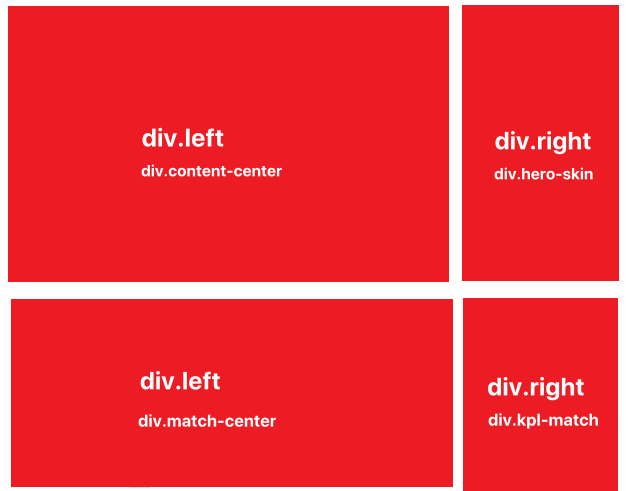
实现王者荣耀首页 https://pvp.qq.com/ 两个div.main-item部分

1. div.main-item

1
2
3
4
5
6
7
8
9
10
11
12
13
14
15
16
17
18
19
20
21
<div class="main-item">
<div class="left-area">
<!-- 内容中心 -->
<div class="content-center">...</div>
</div>
<div class="right-area">
<!-- 英雄/皮肤 -->
<div class="hero-skin">...</div>
</div>
</div>

<div class="main-item">
<div class="left-area">
<!-- 赛事中心 -->
<div class="content-center">...</div>
</div>
<div class="right-area">
<!-- KPL赛程 -->
<div class="hero-skin">...</div>
</div>
</div>

  • 有两个div.main-item,都有div.left-area,div.right-area元素,水平排布
1
2
3
4
5
6
7
8
9
10
11
12
13
.main .main-item {
display: flex;
margin-bottom: 28px;
}

.main-item > .left-area {
width: 872px;
margin-right: 33px;
}

.main-item > .right-area {
flex: 1;
}

2. 共同头部和导航

2.1. div.item_header

1
2
3
4
5
6
7
8
9
10
<div class="item_header">
<div class="left">
<i class="content_icon"></i>
<span></span>
</div>
<a href="#" class="right">
<i class="add_icon"></i>
<span>更多</span>
</a>
</div>
  • 头部都是 i+span 组合,两者垂直居中
1
2
3
4
5
6
7
8
9
10
11
12
13
14
15
16
17
18
19
20
21
22
23
24
25
26
27
28
29
.item_header {
display: flex;
justify-content: space-between;
margin-bottom: 16px;
}
.item_header .left {
display: flex;
align-items: center;
font-size: 22px;
font-weight: 600;
line-height: 25px;
color: #323235;
}
.item_header .left span {
margin-left: 12px;
}

.item_header .right {
display: flex;
align-items: center;
font-size: 14px;
color: #999;
}
.item_header .right:hover {
color: #f3c258;
}
.item_header .right span {
margin-left: 8px;
}

2.2. div.item_nav

1
2
3
4
5
6
<div class="item_nav">
<a class="item active" href="#"></a>
<span class="split"></span>
<a class="item" href="#"></a>
....
</div>
  • 导航都是 a+span 组合,span元素充当a元素之间的分界线
1
2
3
4
5
6
7
8
9
10
11
12
13
14
15
16
17
18
19
20
21
22
23
24
25
26
27
.item_nav {
display: flex;
height: 32px;
margin-bottom: 16px;
background-color: #f5f5f5;
line-height: 29px;
}
.item_nav .item {
display: block;
border-bottom: 3px solid #f5f5f5;
box-sizing: border-box;
font-size: 14px;
color: #999;
text-align: center;
}
.item_nav .item.active,
.item_nav .item:hover{
border-color: #f3c258;
color: #333;
}
.item_nav span {
display: inline-block;
width: 1px;
height: 20px;
margin-top: 5px;
background-color: #e1e1e1;
}

3. div.content-center

1
2
3
4
5
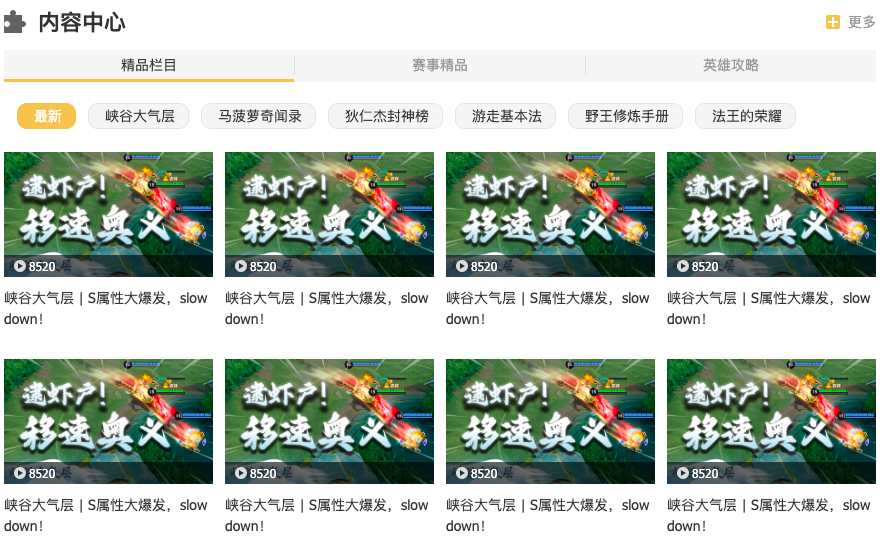
 <div class="content-center">
<div class="item_header">...</div>
<div class="item_nav">...</div>
<div class="content-list">...</div>
</div>
  • div.content-center元素中div.item-nav元素的a元素平分剩余空间
1
2
3
4
5
6
7
/* 内容中心 */
.content-center {
overflow: hidden;
}
.content-center .item_nav .item {
flex: 1;
}

3.1. div.content-list

1
2
3
4
5
6
7
8
<div class="content-list">
<!-- 精品栏目 -->
<div class="area great-part">...</div>
<!-- 赛事精品 -->
<div class="area game-part">...</div>
<!-- 英雄攻略 -->
<div class="area hero-part">...</div>
</div>
1
2
3
4
5
6
7
8
/* 内容列表 */
.content-center .content-list {
display: flex;
}
.content-center .content-list .area {
width: 100%;
flex-shrink: 0;
}

3.2. div.great-part

1
2
3
4
5
6
7
8
9
10
11
12
13
14
15
16
17
18
19
20
21
22
23
24
25
<div class="area great-part">
<div class="caption">
<a href="#" class="item active">最新</a>
<a href="#" class="item">峡谷大气层</a>
<a href="#" class="item">马菠萝奇闻录</a>
<a href="#" class="item">狄仁杰封神榜</a>
<a href="#" class="item">游走基本法</a>
<a href="#" class="item">野王修炼手册</a>
<a href="#" class="item">法王的荣耀</a>
</div>
<div class="sub-content-list">
<!-- 最新 -->
<ul class="video_list">...</ul>
<!-- 峡谷大气层 -->
<ul class="video_list">...</ul>
<!-- 马菠萝奇闻录 -->
<ul class="video_list">...</ul>
<!-- 狄仁杰封神榜 -->
<ul class="video_list">...</ul>
<!-- 游走基本法 -->
<ul class="video_list">...</ul>
<!-- 野王修炼手册 -->
<ul class="video_list">...</ul>
</div>
</div>

3.3. div.caption

  • 该部分的样式,div.great-part元素和div.match-part元素是一样的,div.hero-part有所不同
1
2
3
4
5
6
7
8
9
10
11
12
13
14
15
16
17
18
19
20
21
22
23
24
25
26
27
28
29
30
31
32
33
34
35
/* 内容列表中的内容标题 */
.content-center .content-list .caption {
display: flex;
align-items: center;
padding: 5px 0 18px 13px;
text-indent: 8px;
}
.content-center .content-list .caption .item {
display: inline-block;
padding: 0 13px 0 8px;
border: 1px solid #e5e5e5;
border-radius: 10px;
margin: 0 12px 5px 0;
background-color: #f5f5f5;
line-height: 24px;
color: #333;
}
.content-center .content-list .caption .item.active,
.content-center .content-list .caption .item:hover {
border-color: #f3c258;
background: #f3c258;
color: #fff;
}

/* 英雄攻略中内容列表标题不同 */
.content-center .content-list .select {
display: flex;
align-items: center;
margin: 0 8px 5px 0;
line-height: 24px;
color: #333;
}
.content-center .content-list .select_icon {
margin-left: 5px;
}

3.4. div.sub-content-list

1
2
3
4
5
6
7
8
9
10
/* 内容列表中的内容标题对应子内容 */
.content-center .content-list .sub-content-list {
display: flex;
/* transform: translateX(-100%); */
/* transition: all 0.5s linear; */
}
.content-center .sub-content-list .video_list {
width: 100%;
flex-shrink: 0;
}

3.5. 共同的视频列表

  • 在 div.content-center的多个ul.video_list中
  • 在div.match-center的多个ul.video_list中
1
2
3
4
5
6
7
8
9
10
11
12
13
14
15
16
17
<ul class="video_list">
<li>
<a href="#" class="item">
<div class="pic">
<img src="./img/xxx.jpeg" alt="">
<div class="info">
<em class="data">...</em>
</div>
<div class="mask">
<i class="mask_icon"></i>
</div>
</div>
<p class="title">...</p>
</a>
</li>
...
</ul>

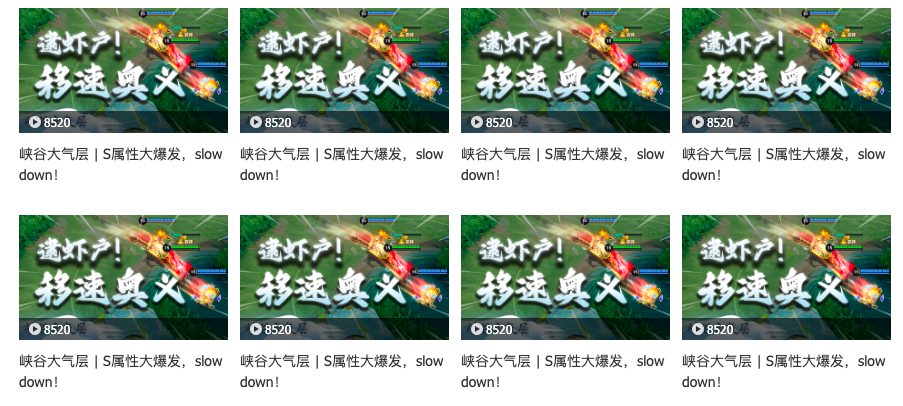
  • div.video_list元素flex布局,允许分行flex-wrap:wrap,元素贴边

  • 每个li元素由内部的a元素撑起来,a元素中有div.pic,p元素。div.pic中有img元素,脱标的div.info和脱标的div.mask

    • div.info相对于div.pic元素绝对定位到底部
    • div.mask默认不可见display:none,当鼠标悬停在div.pic上时显示
  • 一行4个li元素,第4,8个视频项会因为多右外边距而被放到下一行,所以需要去掉4n的右外边距

1
2
3
4
5
6
7
8
9
10
11
12
13
14
15
16
17
18
19
20
21
22
23
24
25
26
27
28
29
30
31
32
33
34
35
36
37
38
39
40
41
42
43
44
45
46
47
48
49
50
51
52
53
54
55
56
57
58
59
60
61
62
63
64
65
66
67
68
69
70
71
72
73
74
75
76
77
/* 内容中心-赛事中心 视频播放样式 */
.video_list {
display: flex;
flex-wrap: wrap;
}
.video_list .item {
display: block;
width: 209px;
margin: 0 12px 30px 0;
}
.video_list li:nth-child(4n) .item{
margin-right: 0;
}

.video_list .item .pic {
position: relative;
height: 125px;
}
.video_list .item .info {
display: flex;
justify-content: space-between;
position: absolute;
left: 0;
right: 0;
bottom: 0;
height: 22px;
padding: 0 10px;
background-color: rgba(0, 0, 0, 0.6);
font-size: 12px;
color: #fff;
}
.video_list .item .info .data {
display: inline-block;
padding-left: 15px;
background: url(../img/sprite/index_sprite.png) no-repeat -256px -59px;
line-height: 22px;
}

/* 遮罩层 */
.video_list .mask {
position: absolute;
left: 0;
right: 0;
top: 0;
bottom: 0;
display: none;
background-color: rgba(0,0,0,0.6);
opacity: 0;
transition: opacity 0.3s ease;
}
.video_list .item:hover .mask {
display: block;
opacity: 1;
}
.video_list .mask_icon {
position: absolute;
left: 50%;
top: 50%;
transform: translate(-50%, -50%);
}

.video_list .item .title {
margin-top: 10px;
color: #333;

/* 显示在两行,多余为... */
word-wrap: break-word;
display: -webkit-box;

/* 超过几行剩余的显示省略号 */
-webkit-line-clamp: 2;
/* webbox方向 */
-webkit-box-orient: vertical;

text-overflow: ellipsis;
overflow: hidden;
}

3.6. div.match-part

1
2
3
4
5
6
7
8
9
10
11
12
13
14
15
16
17
18
19
20
21
22
23
24
<!-- 赛事精品 -->
<div class="area game-part">
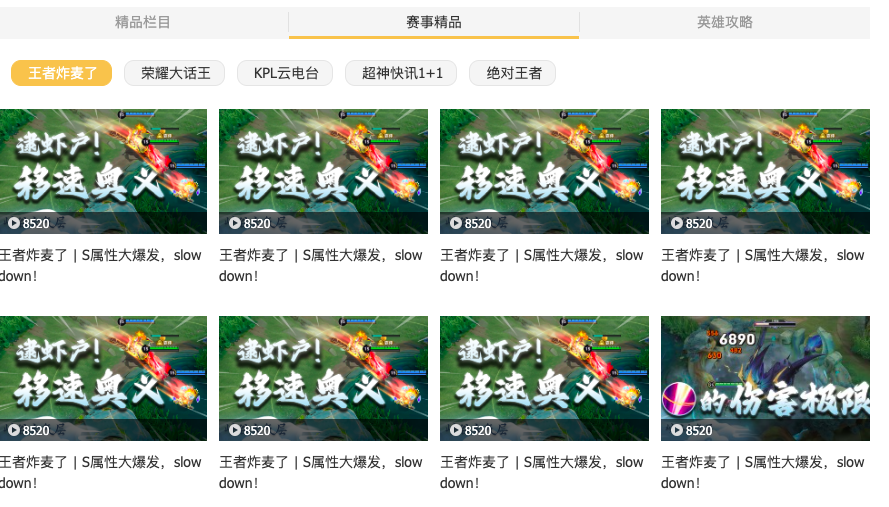
<div class="caption">
<a href="#" class="item active">王者炸麦了</a>
<a href="#" class="item">荣耀大话王</a>
<a href="#" class="item">KPL云电台</a>
<a href="#" class="item">超神快讯1+1</a>
<a href="#" class="item">绝对王者</a>
</div>
<div class="sub-content-list">
<!-- 王者炸麦了 -->
<ul class="video_list">...</ul>
<!-- 荣耀大话王 -->
<ul class="video_list">...</ul>
<!-- KPL云电台 -->
<ul class="video_list">...</ul>
<!-- 超神快讯1+1 -->
<ul class="video_list">...</ul>
<!-- 游走基本法 -->
<ul class="video_list">...</ul>
<!-- 绝对王者 -->
<ul class="video_list">...</ul>
</div>
</div>

  • 布局和样式跟div.great-part一样

3.7. div.hero-part

1
2
3
4
5
6
7
8
9
10
11
12
13
14
15
16
17
18
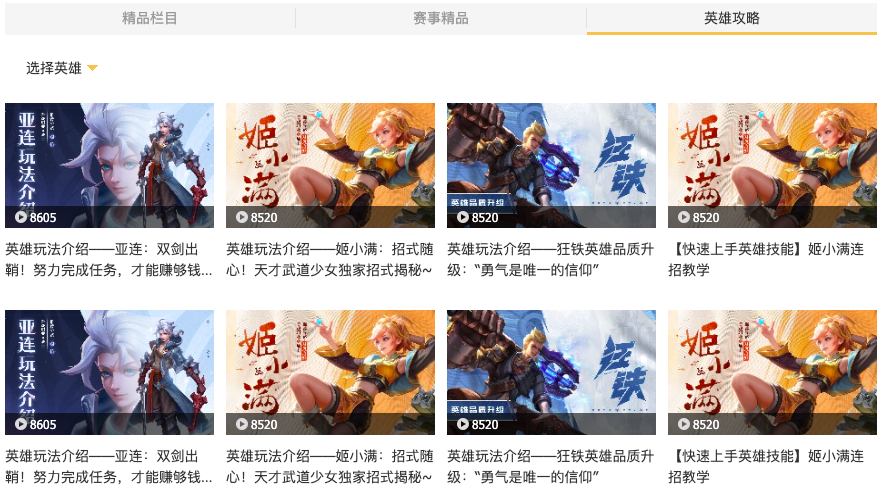
<div class="area hero-part">
<!-- 标题 -->
<div class="caption">
<a href="#" class="select">
选择英雄
<i class="select_icon"></i>
</a>
</div>
<!-- 子导航内容 -->
<div class="sub-content-list">
<ul class="video_list">...</ul>
</div>
<!-- 选择英雄 -->
<div class="dropdown">
<ul class="hero-type">...</ul>
<div class="hero-list">...</div>
</div>
</div>

  • div.hero-part元素中div.caption元素只有一个a元素+i元素
    • 为什么设置div.caption元素的宽度?
      • div.caption元素是块级元素,默认宽度占满整个高度,设置的鼠标悬停样式在扫过div.caption区域就会被触发,意味着鼠标离a.select元素很远,但在同一高度,样式还会被触发
      • 如果设置的是div.caption元素下的a.select元素的鼠标悬停,无法选中a.select元素的父元素的兄弟元素
  • div.hero-part元素的布局隐藏了div.dropdown元素,只有鼠标进入div.caption元素区域,才会显示
1
2
3
4
5
6
7
8
9
10
11
/* 英雄攻略 - 下拉框 */
.content-center .hero-part {
position: relative;
}
.content-center .hero-part .caption {
width: 103px;
}
.content-center .hero-part .caption:hover ~ .dropdown,
.content-center .hero-part .dropdown:hover {
display: flex;
}

3.8. div.dropdown

1
2
3
4
5
6
7
8
9
10
11
12
13
14
15
16
17
18
19
20
21
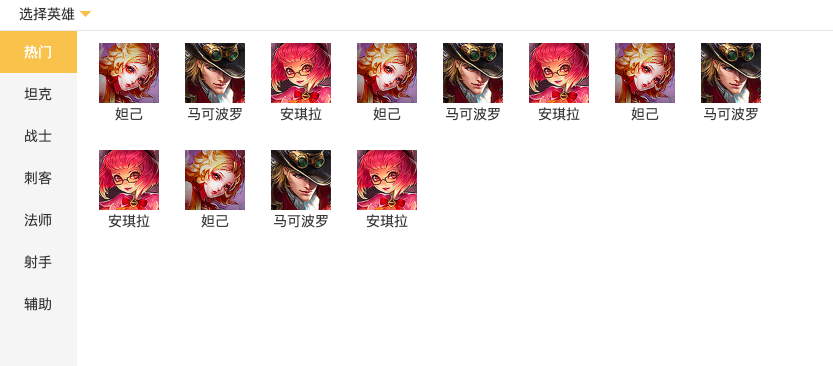
<div class="dropdown">
<ul class="hero-type">
<li><a href="#" class="item active">热门</a></li>
<li><a href="#" class="item">坦克</a></li>
...
</ul>
<div class="hero-list">
<!-- 热门 -->
<ul class="part">
<li>
<a href="#" class="item">
<img src="./img/xxx.jpg" alt="妲己">
妲己
</a>
</li>
</ul>
<!-- 坦克 -->
<ul class="part"></ul>
...
</div>
</div>

  • div.dropdown元素相对于div.hero-part元素绝对定位
  • div.dropdown元素由 ul.hero-type,div.hero-list组成,水平排布
    • ul.hero-type中li元素垂直布局
    • div.hero-list中有多个ul.part元素,每个ul.part元素高度为100%,垂直布局,多余被隐藏
      • ul.part元素flex布局,允许多行,设置overflow-y:auto,允许滚动
1
2
3
4
5
6
7
8
9
10
11
12
13
14
15
16
17
18
19
20
21
22
23
24
25
26
27
28
29
30
31
32
33
34
35
36
37
38
39
40
41
42
43
44
45
46
.content-center .hero-part .dropdown {
position: absolute;
left: 0;
top: 33px;
display: none;
height: 337px;
border: 1px solid #e5e5e5;
background-color: #fff;
overflow: hidden;
}
.content-center .hero-part .hero-type {
width: 78px;
height: 100%;
background-color: #f5f5f5;
text-align: center;
}

.content-center .hero-type .item {
display: block;
height: 42px;
line-height: 42px;
color: #333;
}
.content-center .hero-type .item.active,
.content-center .hero-type .item:hover {
background-color: #f3c258;
color: #fff;
}
/* 图像 */
.content-center .hero-list .part {
display: flex;
flex-wrap: wrap;
align-content: flex-start;
width: 759px;
height: 100%;
padding: 12px 22px;
box-sizing: border-box;
overflow-y: auto;
}
.content-center .hero-list .item {
display: block;
width: 60px;
margin: 0 26px 26px 0;
color: #363636;
text-align: center;
}

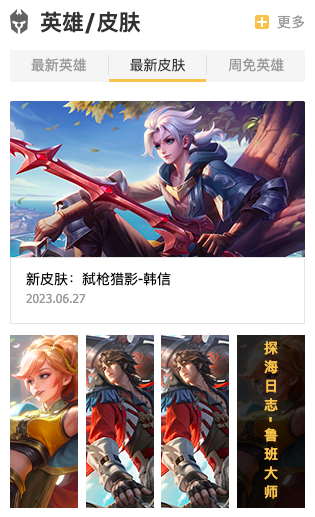
4. div.hero-skin

1
2
3
4
5
<div class="hero-skin">
<div class="item_header">...</div>
<div class="item_nav">...</div>
<div class="hero-content">...</div>
</div>
  • div.hero-skin元素中的div.item-nav的a元素平分剩余空间
1
2
3
4
5
6
7
8
9
10
.hero-skin {
overflow: hidden;
}
/* 英雄/皮肤 */
.hero-skin .item_nav {
margin-bottom: 19px;
}
.hero-skin .item_nav .item {
flex: 1;
}

4.1. div.hero-content

1
2
3
4
5
<div class="hero-content">
<div class="area new-hero">...</div>
<div class="area new-skin">...</div>
<div class="area free-hero">...</div>
</div>
1
2
3
4
5
6
7
8
9
10
/* 导航列表下的不同内容 */
.hero-skin .hero-content {
display: flex;
/* transform: translateX(-200%); */
/* transition: all 0.5s linear; */
}
.hero-skin .hero-content .area {
flex-shrink: 0;
width: 100%;
}

4.2. div.new-hero

1
2
3
4
<div class="area new-hero">
<div class="hero-info">...</div>
<ul class="hero-pic">...</ul>
</div>

  • div.new-hero元素有div.hero-info,div.hero-pic元素,垂直布局
    • div.hero-info元素中有a,div.bottom元素,垂直布局
    • ul.hero-pic元素中有四个li元素,水平布局,平分空间

4.3. div.hero-info

1
2
3
4
5
6
7
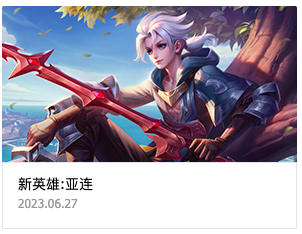
<div class="hero-info">
<a href="#"><img src="./img/xxx.jpg" alt=""></a>
<div class="bottom">
<p class="name"></p>
<p class="time"></p>
</div>
</div>

  • div.bottom元素占45px高,a元素为块级元素占满剩余高度,全部宽度
1
2
3
4
5
6
7
8
9
10
11
12
13
14
15
16
17
18
19
20
21
22
23
24
/* 英雄信息 */
.hero-skin .hero-info {
height: 224px;
border-radius: 2px;
margin-bottom: 10px;
overflow: hidden;
}
.hero-skin .hero-info a {
display: block;
}
.hero-skin .hero-info .bottom {
height: 45px;
padding: 10px 15px;
border: 1px solid #e5e5e5;
}
.hero-skin .hero-info.name {
font-size: 18px;
color: #333;
font-weight: bold;
}
.hero-skin .hero-info .time {
color: #999;
font-size: 12px;
}

4.4. div.hero-pic

1
2
3
4
5
6
7
8
<ul class="hero-pic">
<li class="item">
<a href="#"><img src="./img/xxx.jpg"></a>
<div class="mask"></div>
<span class="name"></span>
</li>
...
</ul>

  • ul.hero-pic元素中有4个li元素,四者有共同宽度的情况下平分剩余空间
  • div.mask,span.name默认不可见,鼠标悬停在li元素上时才显示
  • div.mask,span.name是脱标的,相对于每个li.item绝对定位
    • div.mask是宽高占满整个li元素
    • span.name是水平垂直居中,writing-mode: vertical-lr;表示上下书写
1
2
3
4
5
6
7
8
9
10
11
12
13
14
15
16
17
18
19
20
21
22
23
24
25
26
27
28
29
30
31
32
33
34
35
36
37
38
39
40
41
42
43
44
45
46
47
/* 英雄图片 */
.hero-skin .hero-pic {
display: flex;
flex-wrap: wrap;
justify-content: space-between;
}
.hero-skin .hero-pic .item {
position: relative;
width: 68px;
height: 173px;
margin: 0 7px 12px 0;
cursor: pointer;
}
.hero-skin .hero-pic .item:nth-child(4n) {
margin-right: 0;
}
.hero-skin .hero-pic .item:hover .mask,
.hero-skin .hero-pic .item:hover .name {
display: block;
}
.hero-skin .hero-pic a {
display: block;
width: 100%;
height: 100%;
}
.hero-skin .hero-pic .mask {
position: absolute;
left: 0;
right: 0;
top: 0;
bottom: 0;
display: none;
background-color: rgba(0,0,0,0.8);
}
.hero-skin .hero-pic .name {
position: absolute;
left: 50%;
top: 50%;
display: none;
transform: translate(-50%, -50%);
color: #f3c258;
font-weight: 700;
line-height: 16px;
writing-mode: vertical-lr;
letter-spacing: 5px;
white-space: nowrap;
}

4.5. div.new-skin

  • 布局跟div.new-hero一样

4.6. div.free-hero

  • 布局其实跟div.new-hero一样,只是少了div.hero-info

5. div.match-center

1
2
3
4
5
<div class="match-center">
<div class="item_header">...</div>
<div class="item_nav">...</div>
<div class="match-content">...</div>
</div>
  • div.match-center元素中的div.item-nav的a元素从左开始排布
1
2
3
4
5
6
7
/* 赛事中心 */
.match-center {
overflow: hidden;
}
.match-center .item_nav .item {
padding: 0 18px;
}

5.1. div.match-content

1
2
3
4
5
6
7
8
9
10
11
12
13
14
<div class="match-content">
<!-- KPL -->
<div class="area">...</div>
<!-- 世界冠军杯 -->
<div class="area">...</div>
<!-- 挑战者杯 -->
<div class="area">...</div>
<!-- K甲联赛 -->
<div class="area">...</div>
<!-- 全国大赛 -->
<div class="area">...</div>
<!-- 高校联赛 -->
<div class="area">...</div>
</div>
1
2
3
4
5
6
7
8
9
.match-center .match-content {
display: flex;
/* transform: translateX(-500%); */
}

.match-center .match-content .area {
width: 100%;
flex-shrink: 0;
}

5.2. div.area

1
2
3
4
<div class="area">
<div class="match-news">...</div>
<ul class="video_list">...</ul>
</div>

  • div.area元素中有div.match-news,ul.video_list元素,垂直布局

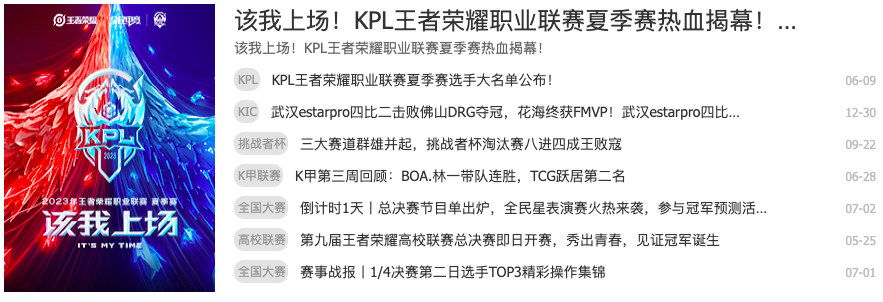
5.3. div.match-news

1
2
3
4
5
6
<div class="match-news">
<a href="#" class="pic">
<img src="./img/xx.jpg" alt="">
</a>
<ul class="news_list">...</ul>
</div>

  • div.match-news有左a.pic,右ul.news_list元素
    • a.pic元素是块级元素,有固定宽度211px
    • ul.new_list元素 flex:1,占满剩余宽度
1
2
3
4
5
6
7
8
9
.match-center .match-content .match-news {
display: flex;
margin-bottom: 15px;
}
.match-center .match-content .pic {
display: block;
width: 211px;
margin-right: 19px;
}

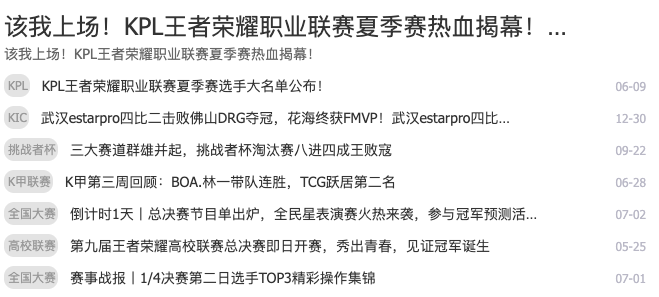
5.4. ul.news_list

1
2
3
4
5
6
7
8
9
10
11
12
13
14
<ul class="news_list">
<li class="title">
<a href="#" class="big"></a>
<a href="#" class="small"></a>
</li>
<li class="item">
<div class="left">
<span class="key"></span>
<a href="#"></a>
</div>
<em class="date"></em>
</li>
...
</ul>

  • div.match-center元素的新闻列表和div.main-top.center元素中的新闻列表布局相似,又有不同
    • 第一个li元素,只是拥有a.big,a.small元素的文字链接
    • 其余li元素,拥有span,a,em元素
1
2
3
4
5
6
7
8
9
10
11
12
13
14
15
16
17
18
19
20
21
22
23
24
25
26
27
28
29
30
31
32
33
34
35
36
37
38
39
40
41
42
43
44
45
46
47
.match-center .news_list {
flex: 1;
}

.match-center .news_list .title {
margin-bottom: 9px;
}
.match-center .news_list .title .big {
display: block;
width: 577px;
font-size: 24px;
line-height: 32px;
color: #333;
}
.match-center .news_list .title .big:hover {
text-decoration: underline;
}
.match-center .news_list .title .small {
display: block;
width: 450px;
line-height: 23px;
color: #666;
}

.match-center .news_list .item {
margin-bottom: 9px;
}
.match-center .news_list .item a {
width: 470px;
color: #333;
}
.match-center .news_list .item a:hover {
text-decoration: underline;
}
.match-center .news_list .item .key {
height: 19px;
line-height: 19px;
border: 2px solid #e3e3e3;
border-radius: 10px;
margin-right: 12px;
background-color: #e3e3e3;
color: #999;
text-indent: 2px;
}
.match-center .news_list .item .date {
color: #b8b9c5;
}

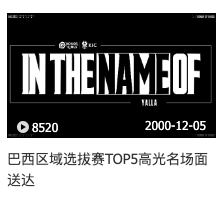
5.5. ul.video_list

1
2
3
4
5
6
7
8
9
10
11
12
13
14
15
16
17
18
<ul class="video_list">
<li>
<a href="#" class="item">
<div class="pic">
<img src="./img/xxx.jpeg" alt="">
<div class="info">
<em class="data">...</em>
<em></em>
</div>
<div class="mask">
<i class="mask_icon"></i>
</div>
</div>
<p class="title">...</p>
</a>
</li>
...
</ul>

  • 布局跟div.content-center中视频列表一样,多了div.info中的em,表现为年-月-日

6. div.kpl-match

1
2
3
4
5
6
7
8
9
10
11
12
13
14
15
16
<div class="kpl-match">
<div class="item_header">
<div class="left">
...
<a href="#" class="center">
<i class="money_icon"></i>
<span>购票</span>
</a>
...
</div>
</div>
<table class="match-content">...</table>
<a class="match-ad">
<img src="./img/wrapper/main-item/kpl-match/match.jpg" alt="">
</a>
</div>

  • div.kpl-match元素中导航div.item_header和其他三个有所不同,多了一个购票链接
  • 导航下是table表格,表格下是a元素的图片
1
2
3
4
5
6
7
8
9
10
11
12
13
14
15
16
17
18
19
20
/* 赛程 */
.kpl-match .item_header .center {
display: flex;
align-items: center;
padding: 0 9px;
border: 1px solid #f3c258;
border-radius: 3px;
margin-left: 20px;
font-size: 14px;
color: #323235;
}
.kpl-match .item_header .center span {
margin-left: 5px;
}
/* 广告位 */
.kpl-match .match-ad {
display: block;
height: 159px;
margin: 15px 0;
}

6.1. .team_icon队徽样式

1
2
3
4
5
6
7
/* 赛程-对战队伍队徽 */
.team_icon {
display: block;
width: 25px;
height: 25px;
margin: 10px auto 0;
}

6.2. table

1
2
3
4
5
6
7
8
9
10
11
12
13
14
15
16
17
18
19
20
<table class="match-content">
<thead class="title">
<tr>
<td>时间</td>
<td>战队</td>
<td></td>
<td>战队</td>
</tr>
</thead>
<tbody class="info">
<tr class="row">
<td class="time">7-2 14:00</td>
<td class="pic"><img src="./img/wrapper/main-item/kpl-match/01.png" alt="" class="team_icon">厦门VG</td>
<td class="pk">VS</td>
<td class="pic"><img src="./img/wrapper/main-item/kpl-match/02.png" alt="" class="team_icon">长沙TES.A</td>
</tr>
<tr class="row">...</tr>
<tr class="row">... </tr>
</tbody>
</table>
  • 表格是4x4的,第一行是表头,有背景色,剩余3行有 时间.time,队伍信息.pic,vs字样.pk,队伍信息.pic 四列组成
1
2
3
4
5
6
7
8
9
10
11
12
13
14
15
16
17
18
19
20
21
22
23
24
25
26
27
28
29
30
31
* 表格 */
.kpl-match .match-content {
text-align: center;
}
.kpl-match .match-content .title {
color: #999;
background-color: #f5f5f5;
line-height: 29px;
}

.kpl-match .match-content .info {
font-size: 12px;
color: #333;
}
.kpl-match .match-content .row {
height: 67px;
line-height: 67px;
border-bottom: 1px solid #e5e5e5;
}
.kpl-match .match-content .time {
width: 80px;
}
.kpl-match .match-content .pic {
width: 80px;
line-height: 24px;
}
.kpl-match .match-content .pk {
width: 55px;
font-size: 14px;
color: #f3c258;
}
本文结束  感谢您的阅读